A Complete Guide to Moving from Sitecore XP to XM Cloud in 2026
Today, when you are using Sitecore CMS to run your digital experience, you are already aware of the power of this platform. However, as the customer demands grow and the adoption of the cloud is rapidly increasing, more and more brands are thinking of replacing Sitecore XP (the traditional, experience-based platform) with Sitecore XM Cloud, which is the cloud-based, SaaS platform based on the cloud-native platforms and speeds, as well as scalability and flexibility in modern development.
The change is occurring at an accelerated pace in 2026, as businesses require fewer upgrades, reduced infrastructure expenses, and easier multi-site management. Should you be wondering when you will be ready to go, this guide will take you through the why, the how, and what to expect during your migration process, in simple, workable language.
Why Businesses Are Leaving Sitecore XP Behind
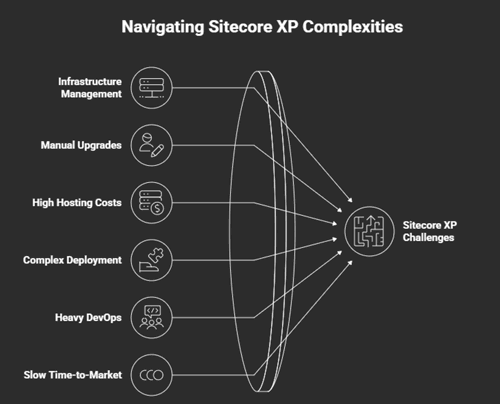
Sitecore XP has been offering its services to enterprises over the years and has been offering advanced personalization, marketing automation, analytics, and a highly connected content + experience layer. But XP is full of heavy responsibilities:
- Infrastructure management
- Patches and upgrades are done manually.
- High hosting costs
- Complex deployment cycles
- Heavy DevOps requirements
- Slow time-to-market
Most brands desire agility above all in 2025. They do not desire a CMS that will keep pace with their marketing department, but one that may be restrained by servers or upgrade cycles. Sitecore XM cloud is there to fill that gap - it is a cloud-native implementation of Sitecore that will remove nearly all of the operational baggage XP carries along with it.
What Makes XM Cloud a Better Fit for 2025
In case Sitecore XP was created during the period of experience platform, XM Cloud is created during the period of composable, cloud-native. The following is what gets different in case you switch to XM Cloud:
- No servers to maintain
- No upgrades — ever
- Faster deployments
- Real headless CMS functionality.
- Easily integrating API-first design.
- Global performance improvement with the help of CDN.
- Lower long-term TCO
- Conveniently manage multiple sites.
- Limits to infrastructure-free freedom of scale.
XM Cloud is also an easy-to-use, lighter, and faster version of Sitecore that teams prefer over the complexity of Sitecore.
XP vs XM Cloud: What’s the Actual Difference?
If you have been using XP all these years, consider XM Cloud to be XP streamlined, with no marketing automation tools, but tuned for performance and scale.
|
Feature |
Sitecore XP |
Sitecore XM Cloud |
|
Hosting |
On-prem / self-hosted |
Fully managed SaaS |
|
Upgrades |
Manual and costly |
Automatic |
|
Architecture |
Composable + headless |
|
|
Marketing features |
Built-in personalization, analytics, automation |
Integrations via CDP, Personalize |
|
Speed |
Depends on infrastructure |
Global CDN + auto-scaling |
|
DevOps needs |
High |
Minimal |
|
Ideal for |
Legacy setups with heavy marketing automation |
Modern, agile brands with scalable needs |
In case your business mostly depends on XP marketing specifications, then you can substitute them with Sitecore Personalize + CDP on XM Cloud.
What You Need to Consider Before Migrating
Sitecore XP to XM Cloud is not a lift-and-shift. It involves planning, but in any case, the outcome is cleaner, quicker setup. These are the big things that you have to consider:
Your Sitecore Architecture today
Do you have a heavy XP configuration regarding custom modules, integrations, or personalization? The more complicated your architecture is, the more you need to plan your migration.
Content Structure
Some teams employ complex content trees. Older content will be cleaned, simplified, or restructured before being relocated to XM Cloud.
Integrations
To confirm XM Cloud compatibility, you should review third-party systems such as CRMs, marketing applications, e-commerce solutions, and analytics solutions.
Personalization Dependencies
In case you use the in-built personalization of XP, you will port those over to Sitecore Personalize or other composable systems.
Front-End Build Approach
XM Cloud is headless-first, so your front-end is likely to be built with Next.js or another framework.
This is why the majority of companies opt to recruit Sitecore developers so that the architecture can be developed quickly, be scalable, and be capable of growing in the future.
Roadmap for Migrating from XP to XM Cloud
We will go through a migration plan of that maintains a positive flow, order, and certainty.
Step 1: Assessment & Audit
You begin by auditing all that:
- Templates
- Components
- Content
- Custom code
- Pipelines
- Third-party integrations
- Analytics setup
This will give you the very idea of what to keep and what to upgrade and what to reconstruct.
Step 2: Cleanup and Rearranging of the contents
It is useless to transfer the unused content to XM Cloud.
You’ll want to:
- Delete outdated pages
- Headdress delivery: rescaffold.
- Normalize media libraries
- Streamline nomenclature.
- Get ready for the content of the modeling approach in XM Cloud.
This is enough to minimize migration time.
Step 3: Reconstruct the Front-end of XM Cloud
XM Cloud is developed to serve headless development. That is that you will most probably rebuild the front-end with:
- Next.js
- React
- Vercel (typical XM Cloud connection)
This provides you with speed, search engine power and an optimized site worldwide.
Step 4: XM Cloud Environment setup
In your new environment, there are:
- Pages
- Cloud Deployment tools
- GraphQL API
- Webhook connections
- Edge delivery
- Mapping configurations
XM Cloud provides you with CI/CD tooling as a matter of course and thus deployments are very fast.
Step 5: Content Migration into XM Cloud.
When the structure is completed, one may migrate content by use of:
- Serialization
- Content migration scripts
- Import automation tools
- Complex layouts are manually adjusted.
It is aimed at a clean, optimized content tree - not an exact copy of your XP mess.
Step 6: Incorporate the Third-Party Systems
Your CRM, marketing channels and commerce tools must be rejoined, but in a more API-friendly manner. Typical integrations are:
- Salesforce
- Dynamics 365
- HubSpot
- Marketing automation tools
- Payment gateways
- Customer data platforms
XM Cloud has a simpler integration, compared to XP due to its composable environment.
Step 7: Test, Optimize and Deploy
When everything has been migrated, the last things to do are:
- QA testing
- Performance optimization
- Rules of personalization establishment.
- Accessibility checks
- SEO migration validation
- Launch planning
Conclusion
The transition to Sitecore XM Cloud is one of the most intelligent long-term choices that you can make into 2025 on the XP platform. You receive agility, speed, cost efficiency, automatic upgrades and a modern-day architecture without the technical debt of your legacy system. XM Cloud enables your marketing team to develop quickly, your developers to do clean, and your infrastructure to scale on demand.
When you want your migration to be seamless, systematic, and future-proof, collaboration with the appropriate professionals makes all the difference. That’s where Arroact comes in. Our Sitecore experts can assist you with auditing your XP environment, re-architecting it, migrating your content, and deploying an entirely tuned XM Cloud environment. Strategy, development, or long-term? Arroact can make your transition to XM Cloud efficient, stable and future-oriented.

Frequently Asked Questions
Related Blogs

Read More
Read More
Read More