I Reverse-Engineered Sitecore’s Marketplace SDK - Here’s What I Actually Found
A few months ago, I wrote about building OrgPulse, my first Sitecore Marketplace app. That post was about shipping something end to end. This one is different. It’s about a week I spent NOT building anything, just reading source code, chasing a docstring, and testing things live in my own App Studio account, because I got tired of guessing whether an API actually does what its description says it does.
It started with a simple goal: find a new app idea that didn’t overlap with anything already in the Marketplace. Along the way I ended up questioning two things the SDK’s own documentation implied, and the answers turned out more interesting than the app idea itself. Here’s the actual trail, with screenshots from my own account and from the SDK’s public repo on GitHub, not a marketing copy.
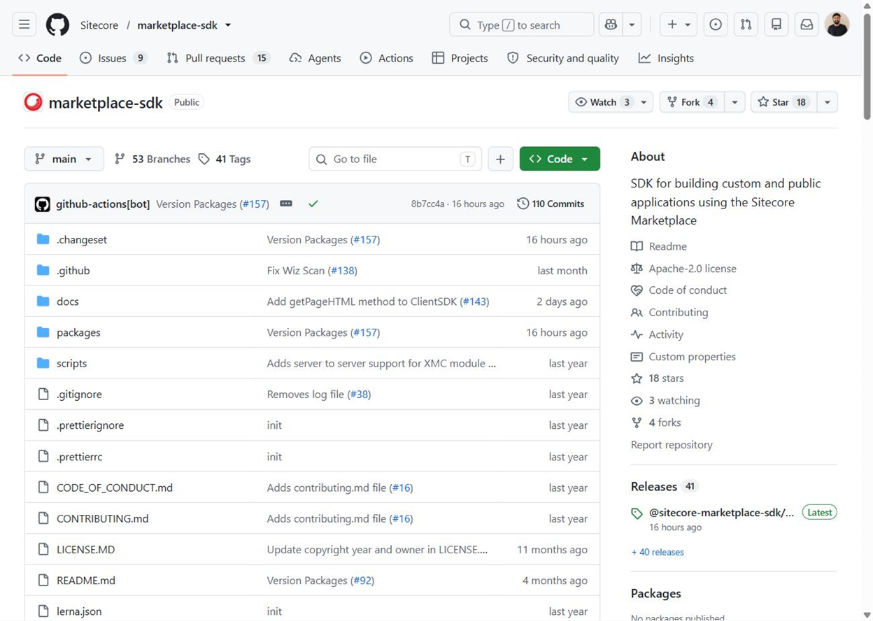
The Marketplace SDK is organized into four packages
The first thing that becomes obvious once you open the marketplace-sdk repository is that the SDK is organized into four packages/modules in its monorepo:
- core: shared plumbing
- client: the piece your app initializes inside its iframe
- xmc: type-safe interfaces for SitecoreAI and XM Cloud APIs, including REST and GraphQL APIs
- ai: wrappers around Sitecore's AI skills APIs
The SDK repository organizes these packages in a single monorepo, with each package serving a different purpose.
Case study 1 - Chasing the brand review API
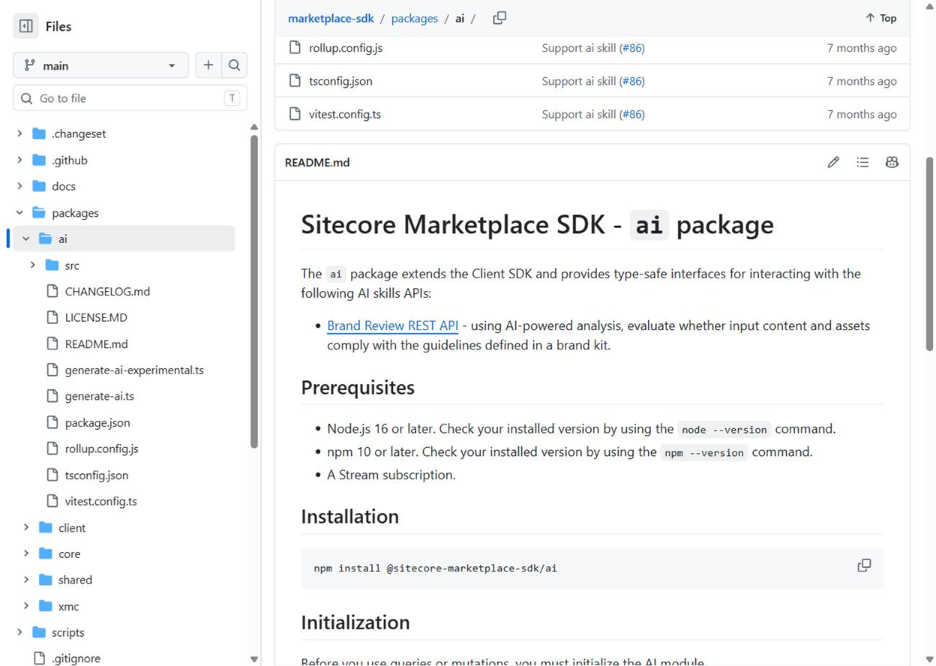
My original idea needed a way to check whether content matches a brand's tone of voice. I remembered seeing something called a Brand Review API mentioned somewhere, so I went into the AI package's README directly instead of trusting a blog post about it.
What the README showed:
- "Brand Review REST API" is right there in the feature list.
- It includes a working code example that calls
client.mutate('ai.skills.generateBrandReview', …). - Under Prerequisites, a line I almost skipped past: "A Stream subscription." That's it. No link, no explanation of which tier.
So, I went to find out what a "Stream subscription" actually gates:
- Sitecore Stream has a free, self-provisionable tier; most orgs experimenting with the Marketplace already have it without asking anyone.
- But the official page for creating a brand kit, which is what the Brand Review API evaluates content against, opens with this note: "Brand kits are only available with Stream Premium."
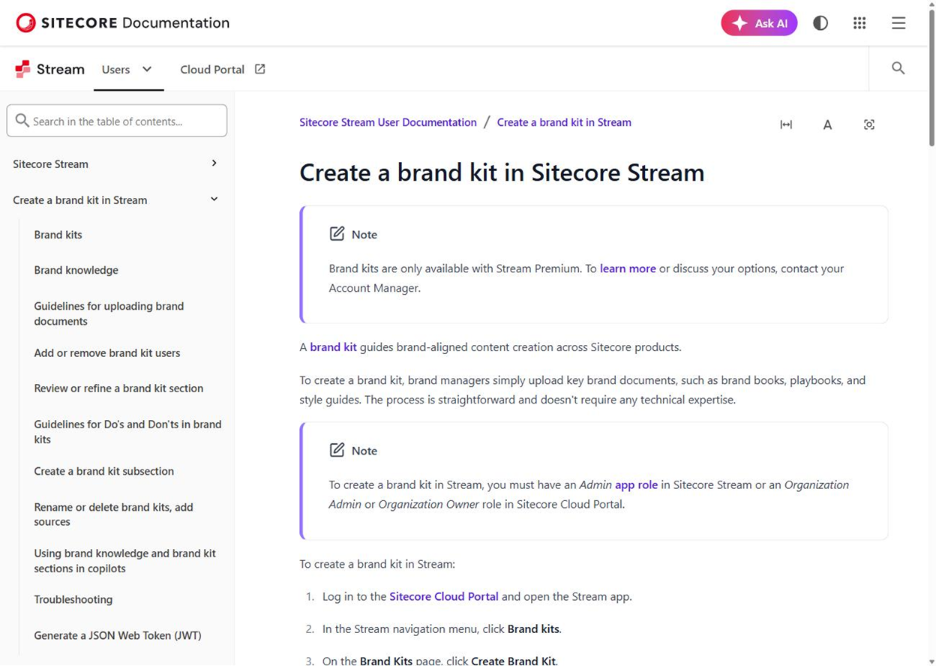
In other words, Brand Review depends on a brand kit, and Sitecore documents brand kits as a Stream Premium capability. The SDK documentation itself lists a Stream subscription as a prerequisite for the AI package. That's not something you'll find by reading the SDK's types. You only find it by reading the product documentation for the feature the API depends on.
I confirmed this wasn't just a docs quirk by checking my own App Studio account:
- Marketplace apps can have API access configured in App Studio, where you select which APIs the app needs to access.
- "Brand Review API" sits in its own separate group called "AI skills APIs."
- It's clearly split apart from the standard "SitecoreAI APIs" group.
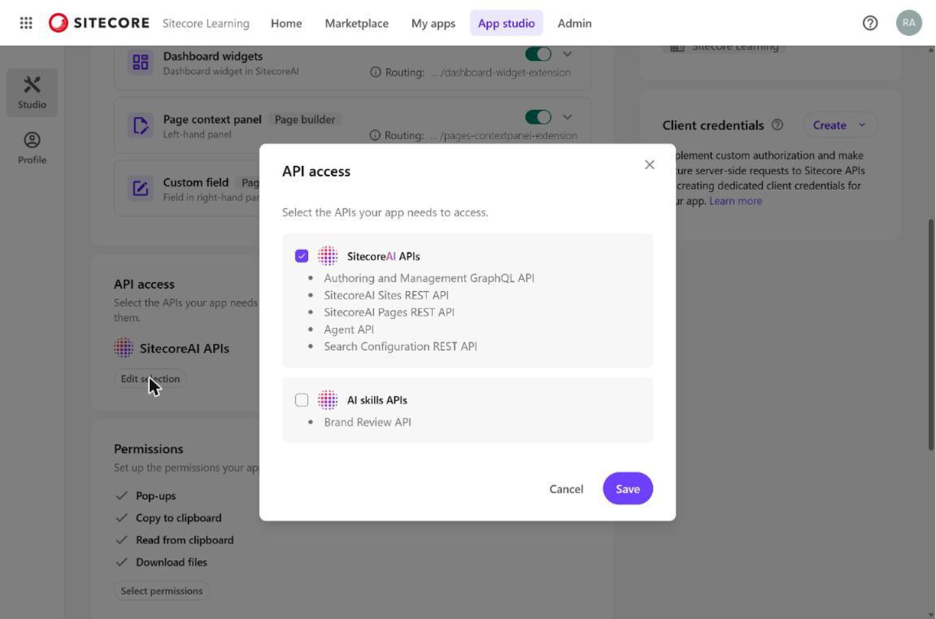
The separate AI skills APIs group indicates that Brand Review requires a distinct API access configuration from the standard SitecoreAI APIs.
Case study 2 - When a docstring oversells the schema
The second thing I went digging for was simpler on paper: is there any API that tells you whether a media asset is actually being used anywhere, so you could build something like an unused-media finder?
The xmc package has a method called assetsGetAssetInformation, and its docstring explicitly says it returns "usage information." That sounded exactly like what I needed.
So instead of writing a single line of app code around that promise, I opened the generated type docs for the response object. Here's the full property list, straight from the repo:
- id
- name
- type
- url
- size
- metadata (alt text, format, height, width)
- innerItem (display name, height, width)
That's it.
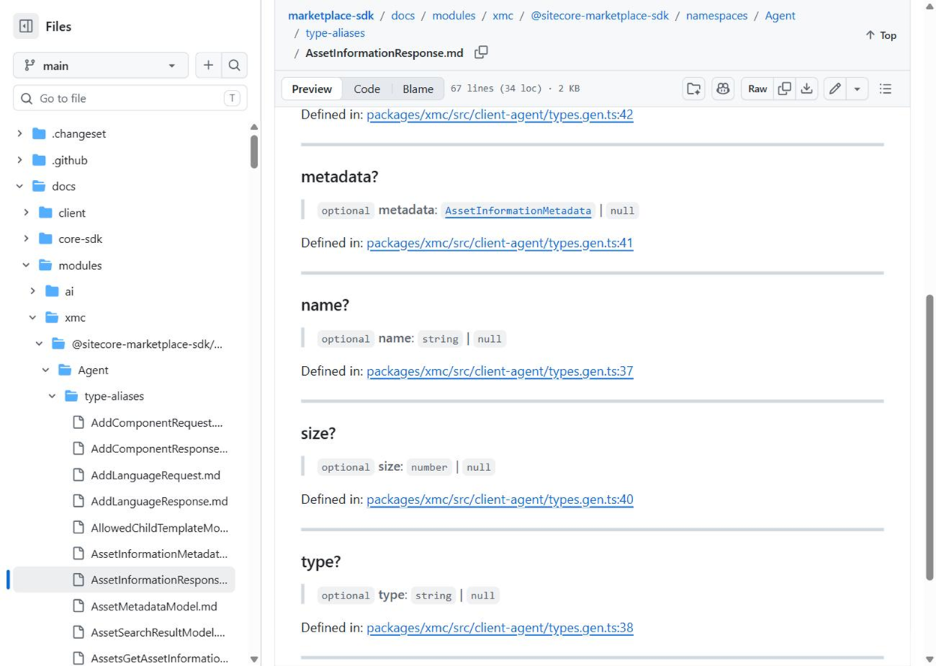
- No usage field
- No reference count
- Nothing that tells you where an asset is used
I even ran a code search across the whole repo for the word "usage" inside that file, zero results. The docstring's promise and the actual shape of the data don't match.
This is the kind of thing you'd only catch by reading the type definitions instead of the prose describing them. It's also exactly why I don't build against an API until I've seen its real schema, not just its description.
Quick reference: packages vs. prerequisites
| Package | What it actually wraps | What it needs before you can use it |
| core | Shared types and utilities used by every other package | Nothing on its own |
| client | The app-to-portal messaging layer that runs inside your iframe | A registered Marketplace app |
| xmc | XM Cloud REST/GraphQL endpoints (sites, pages, search, content transfer) | A SitecoreAI environment with the required API access |
| ai | AI skills APIs (currently Brand Review) | A SitecoreAI environment, AI skills API access, and a Stream subscription; Brand Review additionally requires a brand kit |
Stream free vs. Premium, as far as I can actually verify
| Capability | Confirmed on free/self-serve tier | Confirmed as Premium-only |
| Brand kits (create/manage) | No | Yes, stated directly in Sitecore’s docs |
| Brand Review API | Requires a brand kit for the documented review workflow | Brand kits require Stream Premium |
Note: marked “confirmed” only where I found it stated directly in Sitecore’s own documentation or reproduced it myself in my own account, not inferred from marketing pages.
What I'd tell anyone building on this SDK
- Read the type definitions before you read the marketing page. The types don't have a reason to oversell you anything.
- Treat every "requires a subscription" line as a question, not a checkbox. "A Stream subscription" turned out to mean three different things depending on which feature you actually wanted.
- Test permissions in your own App Studio account before you write code around an API. The API access modal shows you exactly which bucket an API sits in, and that bucket tells you more than most docs pages do.
- Docstrings can drift. Check the actual schema before relying on an API description.
A short checklist before you commit to an API for your next Marketplace app
Before I start building against any Sitecore Marketplace API now, I run through the same five checks:
- Open the actual type and schema docs on GitHub, not just the narrative README.
- Search the surrounding package's README for the word "Prerequisites" and read every line under it.
- If a prerequisite mentions a product tier, go find that product's own docs page and look for the word "Premium" or "Enterprise."
- Add the API in a real test app's API access settings and see which group it lands in.
- If a docstring makes a specific claim, like "usage information", grep the actual response type for that word before trusting it.
None of this stopped me from building; it just changed what I built next and saved me from shipping something that would depend on a Stream Premium capability for anyone needing to use a brand kit. If you're building with this SDK, checking the source and type definitions alongside the official documentation can reveal details that aren't obvious from the higher-level descriptions.

Related Blogs
Introduction In a headless SitecoreAI implementation, Sitecore manages content and page…
Read More
Sitecore's history of headless development has had a number of phases. JSS started out…
Read More
With headless development in Sitecore, there was always only one choice, JSS. It did its…
Read MoreArroact is ready to help you grow.
Our Office

Westface, 519/520, Bhagwat Bungalows Rd, Thaltej, Ahmedabad, Gujarat 380059


Pay us a visit for a cup of coffee. We’ll be more than happy to welcome you.