![Sitecore PowerShell: A Beginner's Guide [2026]](https://d21irbge802zxe.cloudfront.net/media/4cppz5xe/sitecore-powershell_-a-beginners-guide-2026.png)
Sitecore PowerShell: A Beginner's Guide [2026]
Assuming that you have had some experience in Sitecore, there are times when someone would casually mention PowerShell in the same breath. However, what is PowerShell, and what is its importance regarding the development of the Sitecore website?
Keep reading to know all about its features and capabilities.
Introduction: Getting Familiar with the Basics
As a scripting language and command line shell, PowerShell is intended for the purpose of system administration and automation. When it comes to developing Sitecore sites, the use of PowerShell means that it will allow you to communicate with your content management software directly rather than relying on a series of dialog boxes and menus to get the job done.
That’s what makes PowerShell so great; you do not have to be an experienced coder to begin utilizing it. If you are able to write commands and adhere to some syntax, you will gain a lot from PowerShell for your Sitecore projects.
Why Do You Need PowerShell?
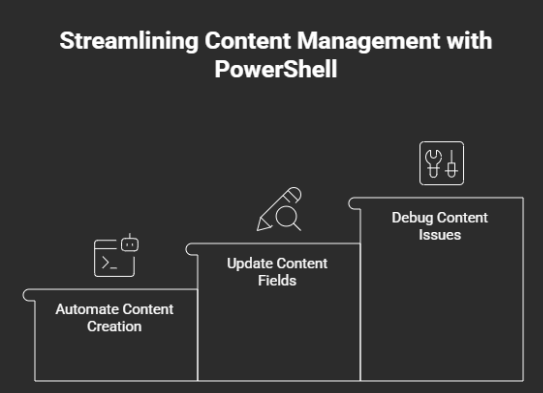
Let’s move on to practical examples. For instance, let’s say you are going to make 200 content items with one template. The work of creating them one by one will require hours—maybe even days. Yet, using PowerShell, you can automate this process with a script written within minutes. Alternatively, imagine that you are required to change a field in hundreds of items. With PowerShell, this task is easily completed.
Apart from automated tasks, PowerShell also helps with debugging. You are able to traverse through your item hierarchy, explore content properties, and see what is going on under Sitecore's hood.
The Strength of Sitecore Specific Commands
Once you dive into using Sitecore PowerShell, you will have at your disposal a series of cmdlets, which were designed to be used to work with Sitecore elements such as items, templates, languages, versions, and workflows. The possibilities here become numerous, especially since not many actions available in Sitecore PowerShell can be achieved via the graphical interface of Sitecore.
For example, with the Sitecore PowerShell, you can easily find all items that are of a certain template type, apply some filters to those items, and then perform a set of actions with all of the items found. You can edit permissions, publish content to a new target, or move large chunks of content from one folder to another and so much more.
All of the actions mentioned above are achieved with the help of Sitecore-specific cmdlets.
Tasks for Beginners
It is recommended that when starting out, one begins from simple tasks. Try using PowerShell for manipulating the content tree. Get used to reading item's properties, how results are displayed, etc. Once these basics are mastered, the task will seem simpler.
One of the most frequent tasks performed by beginners is writing a script which creates a list of objects in the selected folder, displaying their id and name in a .csv file. Additionally, one can create a script analyzing objects according to a specific template.
Every time you execute your code, you obtain new knowledge, realizing that there is actually a certain logic behind these seemingly complicated PowerShell commands.
Common Errors to Be Avoided
The other error that beginners make is attempting to do too many things within a single script. It is the only way to reap any rewards from using PowerShell.
The second thing that should be kept in mind while scripting using PowerShell is that one must not confuse between item versions and the language of items in his or her script. It needs to be noted that some items can have multiple versions and languages within Sitecore.
Lastly, one should always take care not to run his/her script straight away in a live environment. He/she should leave himself enough time to undo the massive change that PowerShell can bring about in such a short while.
Boosting Your Confidence
The learning curve is not too high, but still there. First of all, get an idea about the PowerShell language using the official documentation provided by Microsoft. After that, learn more about the relation between PowerShell and Sitecore. In this respect, online communities like GitHub can be quite useful for you.
Do not hesitate to try experimenting, breaking some code pieces to understand their work. It will be far more beneficial than any literature reading.
The Next Step
As your skills increase with PowerShell, you will be tempted to use PowerShell frequently for solving problems that otherwise would have irritated you in the past. Things that were once annoying become trivial when automation is involved.
Consistency is key. Make sure you spend enough time scripting small scripts on a regular basis. Each script you write will help you gain experience in Sitecore.
Learning How to Install Sitecore PowerShell Extensions
Sitecore PowerShell Extensions will offer further opportunities to users of PowerShell who have advanced enough in their knowledge of the language. Some of these features include using PowerShell modules, running scripts from the Sitecore environment, and using various extensions available for use. Companies like Arroact also utilize these capabilities to enhance their Sitecore development services.
Proficiency in PowerShell scripting now requires less time and effort than previously required for aspiring developers. The level of creativity, knowledge, and expertise involved in learning PowerShell scripting has been significantly reduced due to Sitecore's new developments; thus making it possible for anyone interested in developing their career as a developer through gaining a strong understanding of and utilizing PowerShell scripting can achieve this with the minimum amount of time and effort compared to prior attempts at doing so.

Related Blogs

Every content team hits the same wall eventually: one campaign idea needs to become a…
Read More
If you have worked with Sitecore for a while you may remember when Sitecore marketing…
Read More
On September 22, 2026, Sitecore deprecated Explorer. Its core jobs, creating content and…
Read MoreArroact is ready to help you grow.
Our Office

Westface, 519/520, Bhagwat Bungalows Rd, Thaltej, Ahmedabad, Gujarat 380059


Pay us a visit for a cup of coffee. We’ll be more than happy to welcome you.