Sitecore XM Cloud Architecture: Deep Dive from Edge to Rendering
A deep dive on XM Cloud’s multi-layer architecture that supports content authoring, edge delivery and headless rendering and what it means for teams building modern digital experiences
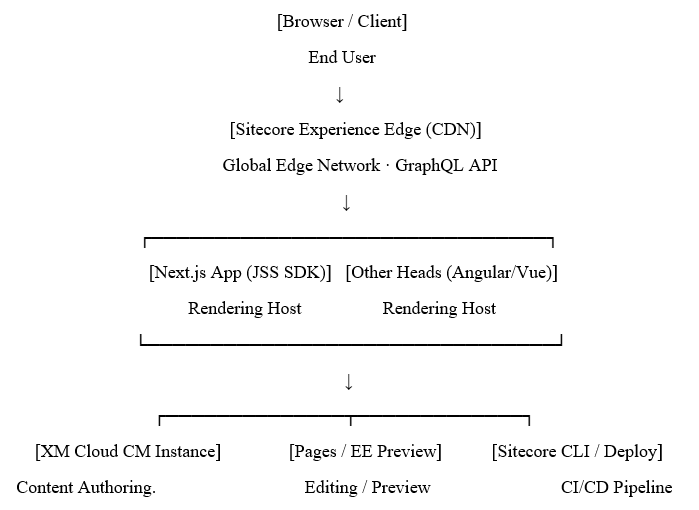
XM Cloud: Request & Rendering Architecture
What is Sitecore XM Cloud
Sitecore XM Cloud is Sitecore’s complete SaaS Content Management System based on Sitecore Experience Manager (XM), but redesigned and optimized for a cloud-native experience. Launched in late 2022, Sitecore XM Cloud revolutionizes how enterprises approach their content architecture because it completely separates the process of content authoring and content rendering from each other.
In contrast with the previous versions of XM/XP software installed on-premises, XM Cloud doesn’t rely on the Content Delivery (CD) server concept. XM Cloud pushes the content to a global edge network and then renders it by separate rendering hosts, Next.js apps, Angular, or any headless frontend using the GraphQL API.
Principle of XM Cloud
XM Cloud is simply a content management system. No HTML pages are rendered by Sitecore. The rendering of pages is your responsibility as the developer because you have full freedom to use any tech stack for that purpose.
The Architecture Layers
An appreciation of the XM Cloud architecture requires an understanding of its four unique layers, each with its unique responsibility and runtime environment.
Layer 1: The Content Management Instance
CM instance is fully managed Sitecore XM environment running on Microsoft Azure. As far as an authoring experience goes, the content management instance in XM Cloud works just like Sitecore XM – you still have Sitecore Items, templates, layouts, and workflows, but there is one difference. Sitecore takes care of infrastructure for you.
Sitecore Pages - The New Authoring Experience
Sitecore Pages are included out of the box in XM Cloud and come to replace a legacy Experience Editor. This is a React-based single page application which consumes Sitecore CM instance through a series of APIs and provides a modern canvas-based editing experience where all components reside on the left side and a live preview area is on the right side.
In terms of architecture, this is a move away from a traditional "in-page" editing experience. Sitecore Pages interacts with a rendering host and uses a special "editing secret" to display your actual components in live preview mode.
Content Serialization with Sitecore CLI
With Sitecore CLI (dotnet sitecore), development teams can serialize Sitecore items to files on disk using Sitecore Content Serialization (SCS), which is YAML based and provided by Sitecore itself, or use a third-party format known as Unicorn, the open community standard for content serialization.
Layer 2: Sitecore Experience Edge
Experience Edge may be one of the key architectural features of XM Cloud. It is a globally distributed, read-only GraphQL delivery API hosted on Fastly CDN. Whenever authors publish content in the CM, that content gets synced to Edge almost instantly and will be delivered from edge nodes closest to the geographic location of end users.
GraphQL Schema
Experience Edge allows teams to deliver content through a GraphQL endpoint. The main query that the JSS SDK uses is layout – returning a whole page layout tree (i.e., route data) with all nested components, datasource field data, and placeholders. Custom GraphQL queries can also be used to retrieve specific content item data or even perform content aggregations to serve content in a wide variety of use cases, including blog listings and product catalog views, without ever accessing the CM at runtime.
Edge Caching & Invalidation
Experience Edge Responses are cached at the CDN level. When the Author publishes their work in the CM, a cache invalidation webhook gets triggered, which clears the cache keys for those resources across all edge nodes. This guarantees that the published content spreads almost instantaneously without necessitating a complete cache invalidation. Since GraphQL responses are cached at the CDN level, subsequent requests to the same layout route and language get fulfilled entirely by the edge cache without making any calls to the origin, resulting in fast TTFB for cached routes in XM Cloud.
Layer 3: The Rendering Host (Next.js + JSS)
Your frontend application is called the rendering host. In the opinion of Sitecore, which makes life easier for you, it should be based on Next.js + JSS (JavaScript Services). From JSS 21.x onwards, out-of-the-box XM Cloud support comes with an Edge-ready data fetching library, Component Builder to register components dynamically, and Sitecore Pages editor integration.
Data Fetching Flow
Here are the steps taken by the Next.js rendering host when the user requests a page.
- Firstly, Route Resolution: the Next.js Dynamic Route matches the URL segments.
- Secondly, the JSS GraphQL Layout Service performs a GraphQL request against the Experience Edge GraphQL API passing path, site and language context.
- Third, Component Hydration: Layout JSON response decoding occurs and each tree node component is linked to its equivalent React component using Component Builder.
- Forth, Next.js will render the component tree using SSR(Server-side rendering), SSG(Static Site Generation), or ISR(Incremental Static Regeneration).
Rendering Approaches: SSG, SSR, ISR
All three rendering methods of Next.js are supported by the XM Cloud rendering host, with wide-ranging implications.
Static Site Generation (SSG) involves rendering the pages beforehand during the build stage, resulting in the fastest speed. It follows a build-and-rebuild cycle when the content changes, which makes it best suited for pages that rarely change and have high traffic. On the other hand, server-side rendering (SSR) relies on rendering the pages per request for content freshness, but at high computational costs.
Editing Integration: The Editing Secret
Sitecore Pages invokes the editing data endpoint of the rendering host by passing the signed token JSS_EDITING_SECRET whenever it renders the preview. This enables the rendering host to permit Sitecore Pages to attach chromes, overlays, and editing tools on top of your React components without compromising on the in-context editing capabilities while keeping the front-end decoupled from Sitecore's rendering engine.
Layer 4: Tooling Deployment and CI/CD
With XM Cloud, a new deployment strategy is introduced, where the CMS is seen as a code configuration. Instead of manually logging in to the server or executing installation commands, XM Cloud Deploy – a web portal and CLI interface – is used to provision an environment, serialize items, and set environment variables.
XM Cloud Deploy and GitHub Integration
XM Cloud Deploy integrates directly with the GitHub repository. Each time there is a commit to a specified branch, it automatically deploys by provisioning or updating the CM environment, serializing the Sitecore items using SCS, executing any PowerShell or CLI scripts included in the pipeline, and optionally initiating a rendering host build in Vercel or Netlify.
It is advised that one create different XM Cloud environments for dev, staging, and production environments, each of which must be linked to their corresponding branches on GitHub. Such a setup is akin to typical software development processes and ensures full traceability.
Multisite Architecture
The XM Cloud multisite feature is excellent. It supports several sites within the same CM installation where each site comes with its own item tree at /sitecore/content/{SiteName}, experience edge site configuration, and rendering hosts (individual or shared, depending on whether Next.js’s multizone functionality is used). In JSS, the site resolver selects the right context for the site based on the hostname, meaning that one deployment supports several brands using one codebase.
Personalization at the Edge
Sitecore Personalize and XM Cloud are combined to target audiences and do A/B testing. In contrast to traditional Sitecore personalization, where personalization features were part of the CD server’s rendering logic, XM Cloud personalization occurs either in the edge or client by leveraging the Sitecore Cloud SDK and Personalize decisioning API. Component variants, rules-based targeting, and experiments are all done separately from the CMS’s rendering process, making the rendering host stateless and cacheable and applying personalization through JavaScript or edge logic.
Key Decisions About Architecture in Teams
Which location should be used for the rendering host? One option from Sitecore is the XM Cloud Pages Hosting powered by Vercel, which is a managed offering. However, teams can choose to deploy rendering hosts to their own instance of Vercel, Netlify, Azure Static Web Apps, or containers. The host itself has no dependency on Sitecore infrastructure; it depends only on the Edge GraphQL API.
Non-page content? Page routing handles some content types only. Products, events, navigation, and other content items may be queried through custom GraphQL queries against the Edge service, bypassing the Layout Service completely. This functionality relies on GraphQL Request Client of JSS that enables typed cacheable queries.
Search and content indexing? There is no built-in solution for search indexing provided in XM Cloud. Teams need to implement Sitecore Search, Coveo, Algolia, or Azure AI Search solutions where search indexes are generated either based on GraphQL introspection or webhook events from Edge.
Conclusion
Sitecore XM Cloud is genuinely an architectural leap from the monolithic on-premise XM/XP architecture. By decoupling content management and content delivery, leveraging edge computing for content delivery, and delegating the task of HTML generation to separate rendering servers, it caters to how teams working with digital technologies expect to do things.
There are trade-offs – rendering infrastructure is now managed separately, teams have to learn about Next.js and use CI/CD practices for content serialization. However, they will be able to scale infinitely using the edge computing infrastructure, will no longer be restricted in terms of their choice of frontend technologies, and won’t have to worry about managing the underlying Sitecore infrastructure themselves anymore.
In the context of large enterprises creating complex content architectures involving multiple brands, Sitecore XM Cloud's architecture can probably be described as the best architecture offered by Sitecore to date.

Related Blogs
A few months ago, I wrote about building OrgPulse, my first Sitecore Marketplace app.…
Read More
Introduction In a headless SitecoreAI implementation, Sitecore manages content and page…
Read More
Sitecore's history of headless development has had a number of phases. JSS started out…
Read MoreArroact is ready to help you grow.
Our Office

Westface, 519/520, Bhagwat Bungalows Rd, Thaltej, Ahmedabad, Gujarat 380059


Pay us a visit for a cup of coffee. We’ll be more than happy to welcome you.