Working with Sitecore XM Cloud & Experience Edge: Developer Insights
Introduction
I’ve been working with Sitecore for around 8 years, mostly on MVC-based solutions, and some headless implementations. Recently, I had the opportunity to work with Sitecore XM Cloudand its delivery layer, Sitecore Experience Edge.
In this blog, I’m not repeating official documentation. Instead, I want to share my developer-level understanding, how the system actually works in practice, what confused me initially, and what insights might help other Sitecore developers—especially those coming from an XP background.
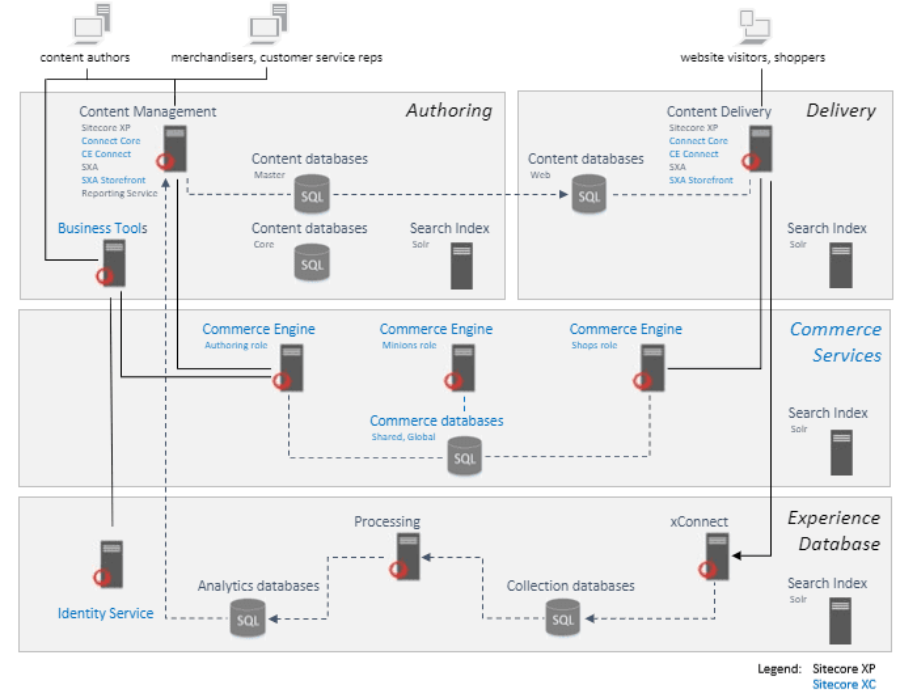

If you’ve worked with Sitecore XP for years, you’re used to:
- CM and CD servers
- Publishing targets
- Web database
- Scaling CD servers under heavy traffic
- Infrastructure and upgrade responsibilities
XM Cloud changes this model completely.
XM Cloud is SaaS and headless-first. There are:
- No traditional CM/CD servers to manage
- No web database
- No server-side MVC rendering
From a developer’s perspective, this means:
- Less infrastructure work
- More focus on content modeling and APIs
- A mindset shift toward frontend-driven architecture
What Experience Edge Actually Does (Developer View)
From documentation, Experience Edge sounds complex. In reality, I think of it like this:
Experience Edge is the delivery layer that serves published XM Cloud content via GraphQL APIs, backed by a CDN.
There is no CD server like Sitecore XP.
In simple terms:
- Editors create and publish content in XM Cloud
- Published content is pushed to Experience Edge
- Frontend applications (Next.js, React, etc.) fetch content using GraphQL
Once I understood this, many things started to make sense.
Content Flow: XM Cloud → Experience Edge → Frontend
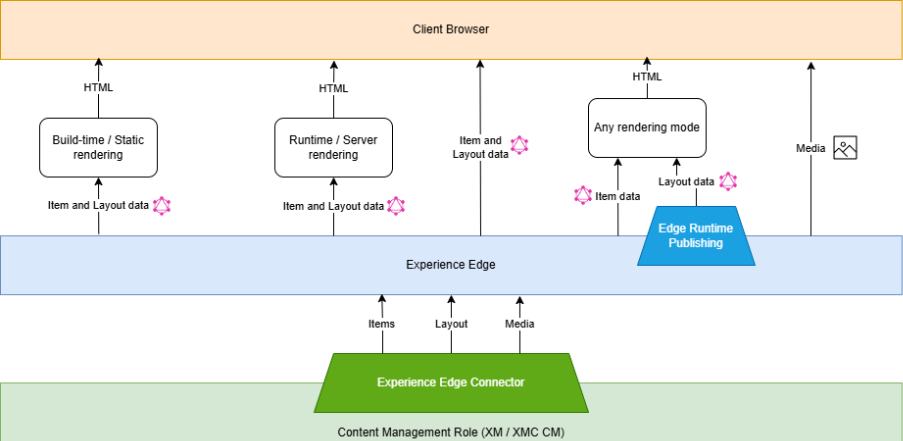
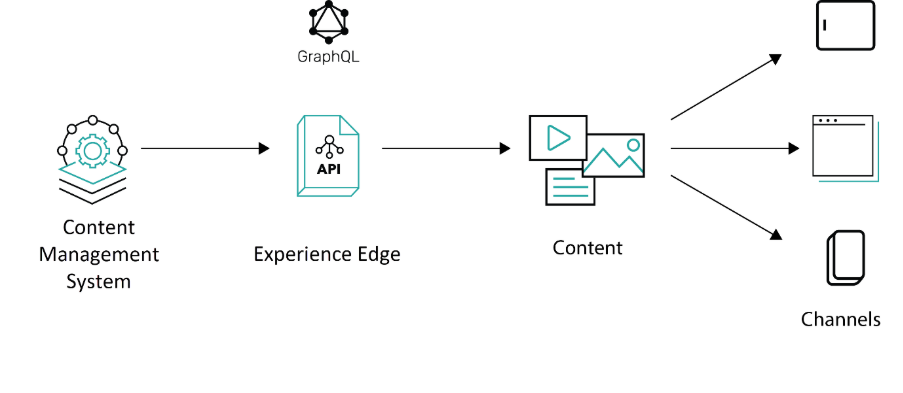
This flow is critical to understand, especially if you’re coming from XP.
Actual content flow:
- Content author creates or updates an item in XM Cloud
- The item is published
- Content becomes available in Experience Edge
- Frontend consumes the data via a GraphQL endpoint
There is no concept of “rendering on CD” here. Everything depends on APIs.
This makes frontend performance much better, but also means developers must clearly understand publishing and caching behavior.
GraphQL in Experience Edge – How I Used It
GraphQL is the primary way to fetch content from Experience Edge.
From a developer perspective:
- Queries are site-aware
- Language must be handled carefully
- You only fetch what you need (performance win)
Initially, I faced issues where:
- Queries returned null
- Content didn’t appear after publish
Most of the time, the reasons were:
- Wrong site context
- Incorrect language parameter
- Content not actually published
Once these basics are clear, GraphQL becomes very powerful and predictable.
Preview vs Delivery Endpoints (Important Concept)
This part confused me initially, so it’s worth calling out clearly.
Preview Endpoint
- Used for content authors
- Shows unpublished or draft content
- Commonly connected to Experience Editor or preview mode
Delivery Endpoint
- Used for live users
- Fully cached
- Serves only published content
Understanding which endpoint your frontend is using is critical. Many “content not showing” issues are actually endpoint misunderstandings.
Caching Behavior – What Developers Should Know
Experience Edge uses CDN-based caching.
From my experience:
- Performance is excellent once content is cached
- There may be a short delay after publishing
- You don’t have the same cache-clearing control as XP
This is not a drawback—it’s a trade-off.
You gain performance and scalability but lose some low-level control.
Challenges I Faced (Real Experience)
Some practical challenges I encountered:
- Content not visible immediately after publish
- Confusion around language fallback
- GraphQL queries failing due to incorrect site configuration
- Expecting XP-like behavior in a SaaS setup
The biggest learning was this:
XM Cloud is not XP in the cloud. It’s a different product with a different mindset.
Once I stopped comparing everything to XP, development became much smoother.
When Experience Edge Is a Good Fit (and When It’s Not)
Good fit:
- Headless websites
- High-traffic public sites
- Performance-focused applications
- Frontend frameworks like Next.js
Not ideal for:
- Heavy server-side personalization
- XP-style MVC rendering needs
- Complex CD-side business logic
This kind of decision-making is important at a senior developer or lead level.
Final Thoughts
From a developer’s perspective, XM Cloud with Experience Edge represents a major shift in how Sitecore solutions are built and delivered.
If you come from a strong Sitecore XP background, there is a learning curve—but it’s manageable and worth it. Once understood, XM Cloud simplifies infrastructure, improves performance, and aligns well with modern frontend development.
I see this as the future direction of Sitecore, and as developers, adapting to it is not optional—it’s necessary.

Related Blogs

Read More
Read More
Read More