
Structuring a Production-Grade Sitecore Solution: Helix Architecture Decisions That Actually Matter
Every Sitecore project eventually hits the same wall: the demo site works; the client is happy, and then six months later nobody wants to touch the codebase because nobody can tell where one feature ends, and another begins. That's usually the point where a team either commits to a proper Helix structure or spends the next two years fighting their own folder hierarchy. On a recent multi-region implementation, we went in with Helix from day one and looking back, the architecture decisions we made early on are the reason the platform is still maintainable today.
This isn't a "what is Helix" post. If you want the official definition, Sitecore's documentation covers that well enough. This is about the actual decisions, trade-offs, and occasional rule-bending that happen when you apply Helix to a real, multi-region, multi-brand-site platform instead of a tutorial project.
Why we didn't just wing it
The project we inherited had grown a multi-region footprint:
- Separate regional sites sharing one platform
- Some shared components, some region-specific ones
- A marketing and forms layer sitting on top
Without a strict separation of concerns, that combination turns into spaghetti fast, a "fix" for one region's homepage banner can silently break another region's checkout flow, just because someone reused a rendering that was never meant to be shared.
Helix's answer to this is deceptively simple: put everything into one of three buckets and only allow dependencies to flow in one direction.
- Foundation - technical/infrastructure code that has no idea what business problem it's solving
- Feature - business capability, a specific thing the site does
- Project - the glue: layout, site-specific configuration, and anything that only makes sense for one particular site
The rule that actually matters: Feature modules can depend on Foundation; Project can depend on both, but nothing is allowed to depend upward. Foundation never knows Feature exists. Feature modules never talk to each other directly.
That single dependency rule is what saved us later. When one region wanted a completely different navigation experience, we didn't have to worry about it breaking the other regions, because the navigation feature module had zero knowledge of anything above it in the dependency chain. It could be swapped, rewritten, or versioned independently.
What this actually looks like in the tree
The root content tree shows the standard split:
- Content
- Layout
- Media Library
- System, and
- Templates
With the Content node holding a Tenant structure underneath it rather than a single flat site. That tenant/site split is what made the multi-region setup possible in the first place: each region lives as its own site definition under a shared tenant, inheriting shared settings without duplicating them.
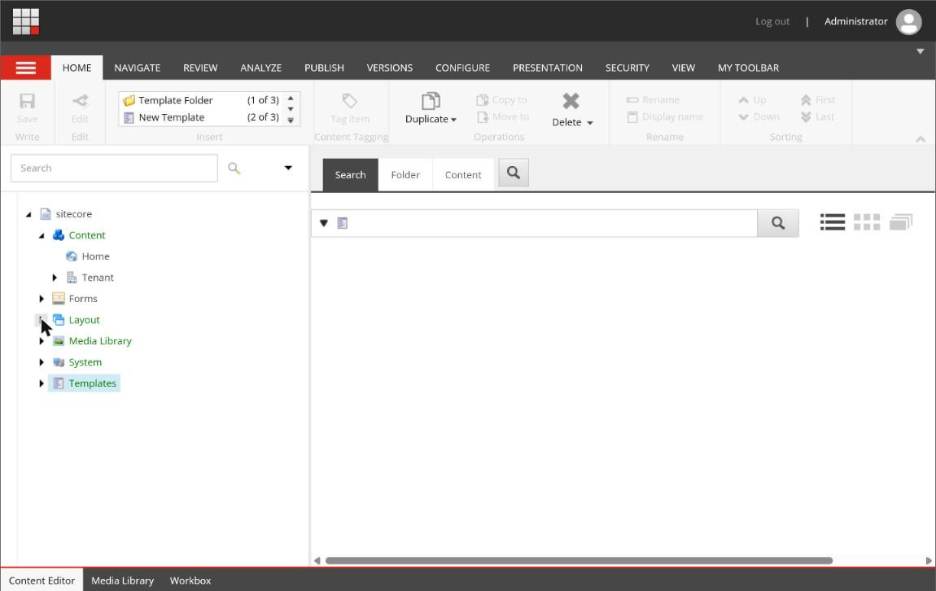
Root content tree - Content, Layout, Media Library, System and Templates nodes
Where Helix really shows up is under Templates and Renderings. The Templates node breaks into Foundation, Feature, Project, Sample, and User Defined, the same pattern Sitecore's own SXA modules use, extended with our own layers sitting alongside them rather than mixed into them.
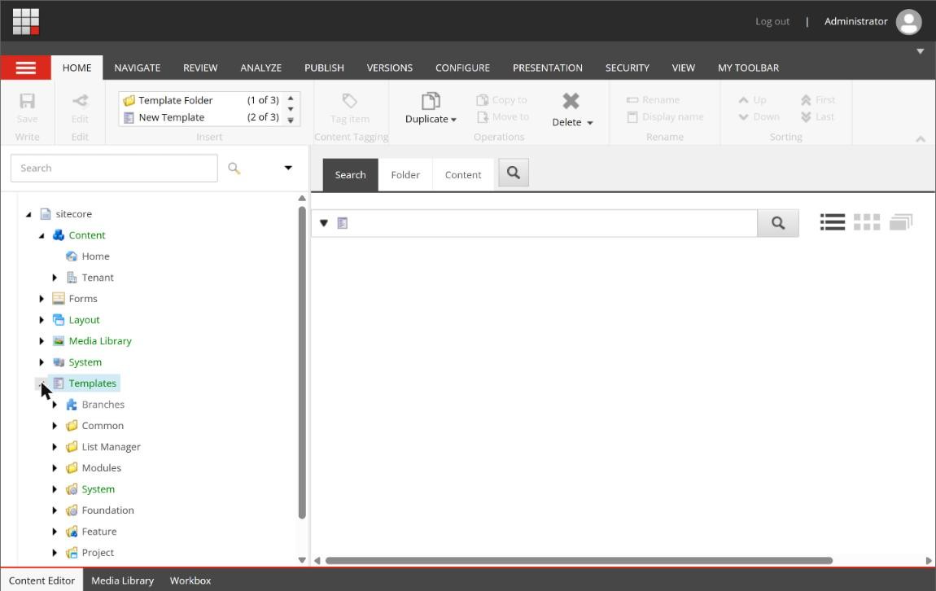
Templates tree - Foundation / Feature / Project layers
Expanding Feature shows how the modules are actually named and grouped. Notice that "Experience Accelerator" and "Headless Experience Accelerator" sit as separate Foundation-level dependencies rather than one blob:
- Part of the platform still renders traditionally through SXA
- Newer components are built against a headless rendering pipeline
- Keeping those two rendering models in clearly separated Foundation layers meant we could migrate components to headless incrementally, feature by feature, instead of doing a disruptive big-bang rewrite
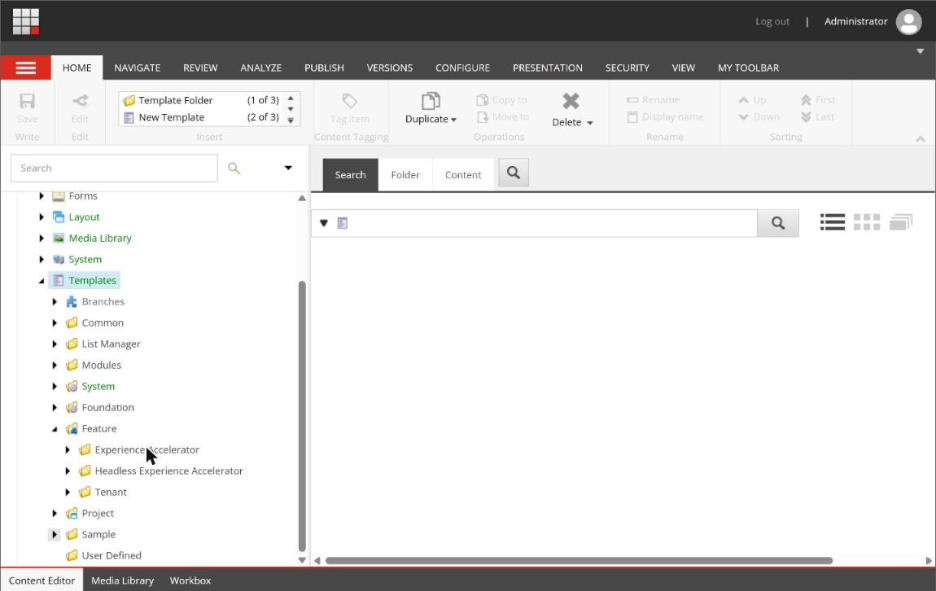
Feature layer expanded - modules grouped by rendering model
The Renderings tree mirrors the same structure, System, Foundation, Feature, Project which is a detail a lot of teams skip. It's tempting to keep your template layering strict but let your renderings and controllers live wherever's convenient. We didn't allow that:
- If a rendering belongs to a feature, its Sitecore item, its controller, and its view all live inside that feature's boundary
- That consistency is what makes onboarding a new developer fast, they open one folder and see the whole vertical slice of a feature, not fragments scattered across five unrelated places
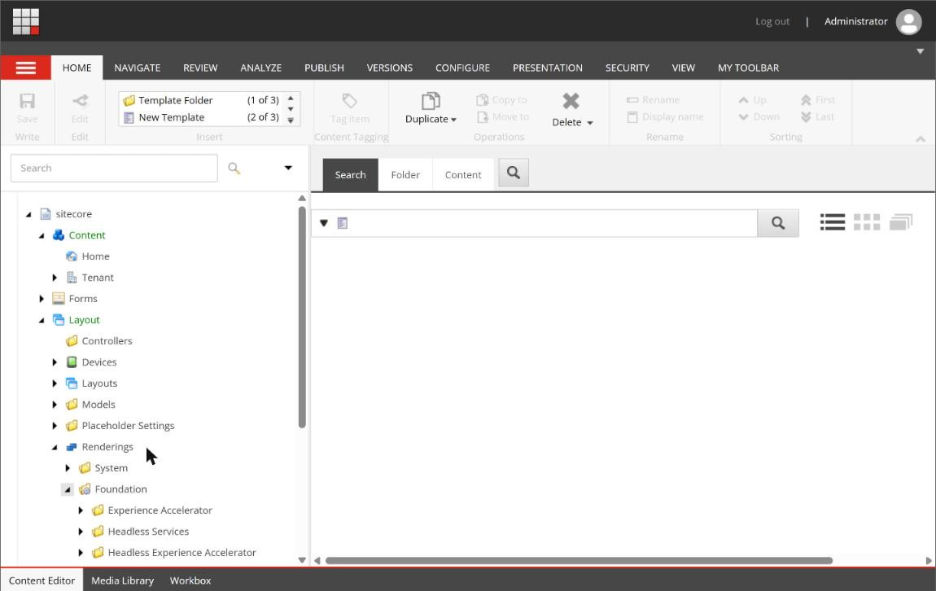
Renderings tree — Foundation layer, mirroring the Templates structure
Where we bent the rules on purpose
Helix purists will tell you Feature modules should never depend on each other. In practice, we broke that once, deliberately, for a shared "content card" pattern that half a dozen features needed.
Rather than duplicate the rendering six times or create an awkward circular dependency:
- We pulled the card component down into Foundation as a generic, business-agnostic UI primitive
- Each feature configures it rather than extends it
That's the real skill in applying Helix on a live project, knowing when something that looks like a feature concern is actually infrastructure wearing a business hat, and demoting it a layer.
We also resisted the urge to create a new Feature module for every single content type. Early on there's a temptation to spin up a dedicated module for something as small as a "testimonial" or an "award badge." We set a rule for ourselves, a module only earns its place if it has:
- Its own distinct data model
- Its own rendering logic
- A reason to be deployed or versioned independently
If it doesn't meet those three, it goes into an existing content-marketing feature instead. Over-fragmenting a codebase into dozens of tiny modules creates just as much maintenance overhead as not separating it at all.
The part nobody tells you: serialization and source control pain
Helix looks clean in a diagram. It's less clean the first time two developers modify sibling items in the same Feature folder and your serialization tool (Unicorn or TDS, depending on your stack) throws a merge conflict because both changes touched the same parent item's child-order field.
The layer boundaries don't protect you from that, only good branching discipline and small, frequent commits do. What worked for us:
- Keep Feature-level changes narrowly scoped to single pull requests
- Avoid batching multiple unrelated feature changes into one deployment
- Remember that untangling a bad merge inside a shared Foundation template is far more expensive than untangling one inside an isolated Feature module
What actually paid off
Six months after go-live, the real test came: the business wanted an entirely new region added to the platform.
Because the Project layer was thin and only held site-specific glue, and because every reusable piece of functionality already lived cleanly in Feature and Foundation, standing up the new region was mostly configuration:
- A new site definition
- New Project-level layout wiring
- Reuse of ninety percent of the existing Feature modules, untouched
That's the actual payoff of Helix done properly, not cleaner diagrams, but a system where adding a whole new site doesn't mean touching code that has nothing to do with that site.
The Bottom Line
If you're starting a new Sitecore build today, the advice isn't "use Helix because Sitecore recommends it." It's this:
- Decide upfront which pieces of your platform are truly infrastructure
- Decide which are business capabilities
- Decide which are site-specific glue
- Be disciplined about which direction dependencies are allowed to flow
The framework is just scaffolding. The discipline is what keeps a platform maintainable for two years and three new markets later.

Related Blogs

Every content team hits the same wall eventually: one campaign idea needs to become a…
Read More
If you have worked with Sitecore for a while you may remember when Sitecore marketing…
Read More
On September 22, 2026, Sitecore deprecated Explorer. Its core jobs, creating content and…
Read MoreArroact is ready to help you grow.
Our Office

Westface, 519/520, Bhagwat Bungalows Rd, Thaltej, Ahmedabad, Gujarat 380059


Pay us a visit for a cup of coffee. We’ll be more than happy to welcome you.