Taming Environment Sprawl: A Practical Governance Framework for Sitecore Cloud Portal
If you have worked with Sitecore Cloud Portal for more than a few months, you already know the feeling. You log in to check on one project, and the “Sitecore Cloud” section on your Home page is a wall of tiles. Dev environments, training environments, demo environments, trial environments, some clearly named, some named after the person who built them, some named after a date, and a few you honestly cannot explain anymore.
This is not a beginner problem. It is an architecture problem. And as Sitecore adoption grows especially with SitecoreAI environments being spun up quickly for demos, training, and proof-of-concepts, it gets worse fast, not slow. This post is a practical governance framework you can apply to your own organization, based on what Cloud Portal actually gives you today and where you need to add process on top of it.
The problem: a flat model that does not scale on its own
Cloud Portal organizes everything in a simple structure: an organization, a set of projects, and environments underneath them. That structure works well when you have five or six environments. It starts to break down once an organization is running dozens of them.
Below is a real example from a working Sitecore Cloud Portal organization (names and client details have been redacted for privacy, the point here is the pattern, not who owns which environment).
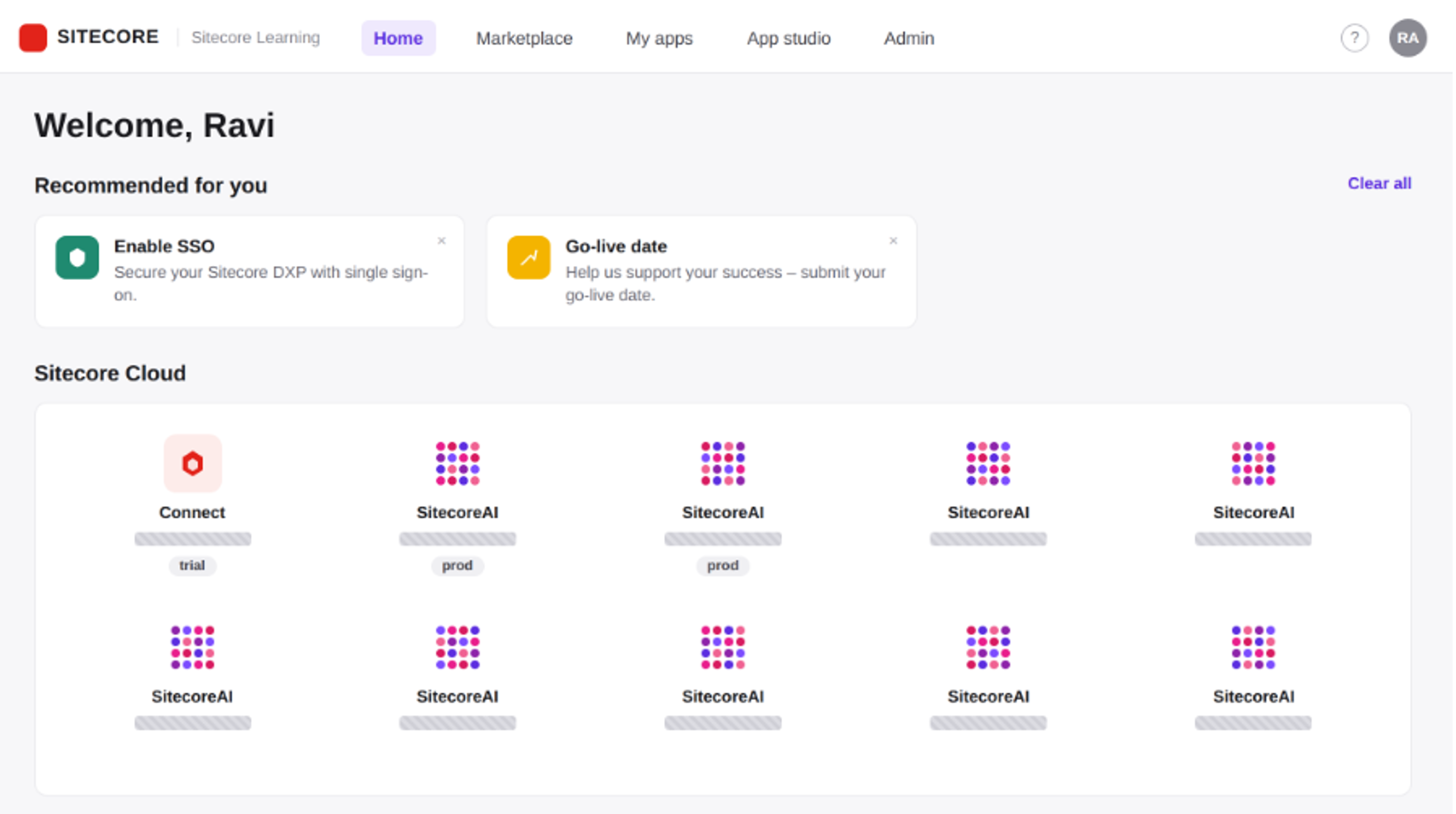
Fig. 1 - Sitecore Cloud Portal Home dashboard: many SitecoreAI environment tiles, names redacted, only status badges (trial / dev / prod) visible.
Notice what you can still read even with the names hidden: status badges like trial, prod, and training sitting side by side, with no visual grouping by client, by team, or by purpose. Scroll further and you find custom apps mixed into the same list.
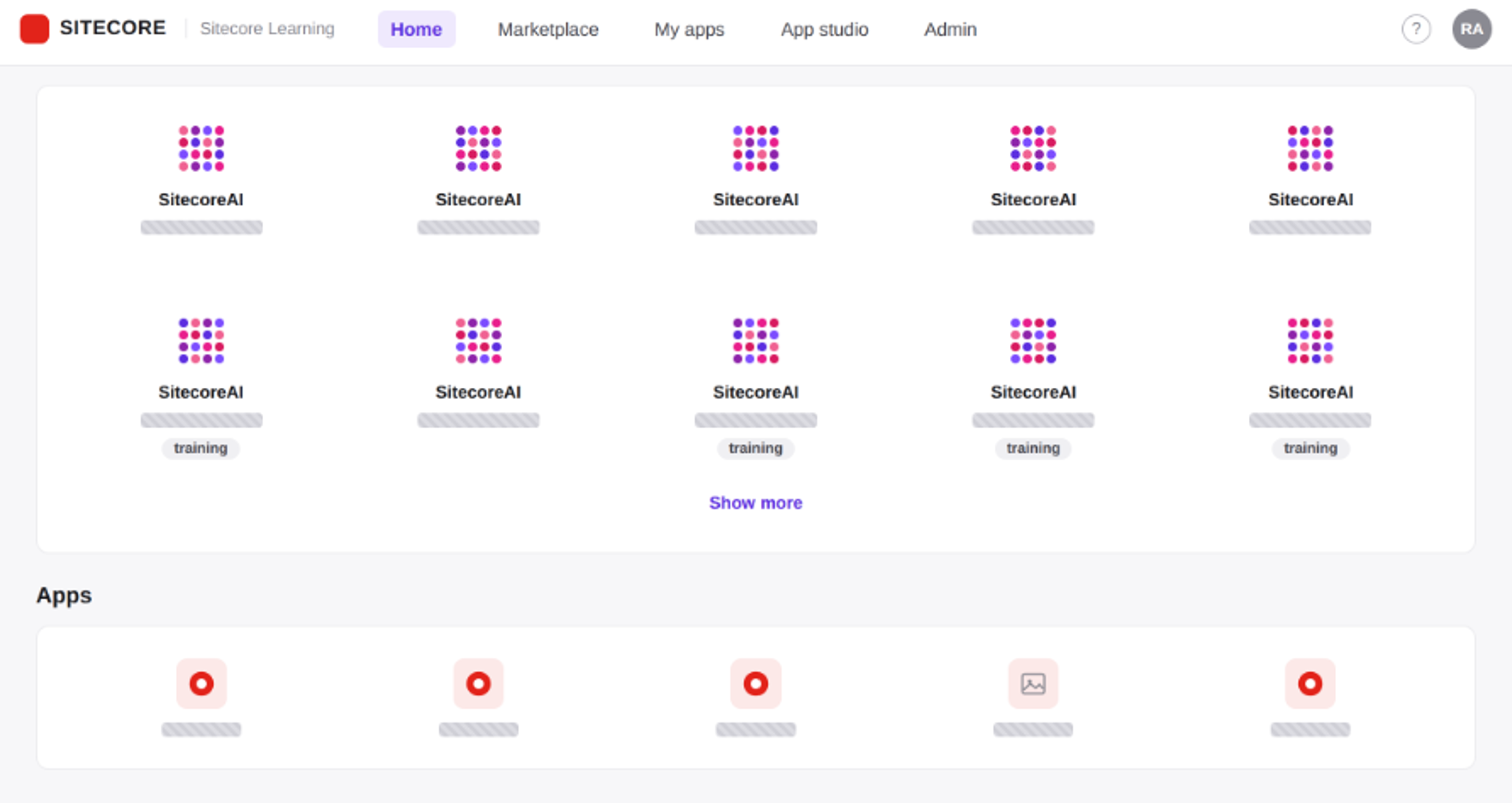
Fig. 2 - The rest of the environment grid, plus a separate Apps section, names redacted.
This is what “sprawl” looks like in practice: a flat list that keeps growing, with no built-in expiry, no enforced naming rule, and no clear owner per environment once the person who created it moves on to another project.
Why this happens
A few root causes show up again and again:
No naming convention is enforced by the platform. Cloud Portal lets you name an environment anything you like when you create it. That is good for flexibility, but it means naming discipline has to come from your team's process, not from the tool. Left alone, people default to their own name, the client's name, or a date which is exactly what you see happen at scale.
Trial and demo environments do not have an organization-defined lifecycle policy in Cloud Portal. A SitecoreAI trial spun up for a two-week proof-of-concept can remain available after the concept is proven or dropped, so organizations should define an explicit expiry and review process.
Production and non-production environments are presented together in the dashboard, with status badges helping distinguish their stage. There is no structural grouping by environment stage in the list.A new team member scanning the dashboard has to read every badge carefully to know which environments are safe to poke at and which are not.
Ownership fades over time. Environments created for one engagement often outlive the engagement itself and outlive the person who sets them up. Without a documented owner, nobody feels responsible for cleaning it up.
A naming and tagging convention that actually scales
Since Cloud Portal will not enforce this for you, the fix has to be a convention your team agrees on and applies every time an environment is created. A pattern that has worked well:
<client-or-project>-<purpose>-<stage>
For example, acme-headlessmigration-dev or acme-headlessmigration-prod. This single rule solves three problems at once: it groups related environments together alphabetically in the list, it makes the purpose obvious without opening the environment, and it makes prod instances easy to spot because the suffix is consistent.
For demo and training environments, the ones most likely to be forgotten adding an expiry hint directly in the name, such as acme-demo-exp2026-09. It is a small thing, but it turns “I'll clean this up eventually” into a visible, dated commitment.
Lifecycle governance: deciding when an environment should die
A naming convention tells you what the environment is like. A lifecycle policy tells you how long it should exist. A simple three-tier policy covers most organizations:
Trial and demo environments get a 30-to-60-day default lifespan, reviewed at creation time and renewed only for a reason. Training environments tied to a specific course or workshop get decommissioned within a week of the session ending. Dev and staging environments tied to an active project stay alive for the life of the project, with a checkpoint at each major milestone to confirm they are still needed.
None of this happens automatically inside Cloud Portal today, there is no built-in expiry switch on an environment. That means the review has to be a recurring calendar task owned by someone specific, not a “someone should probably do this” item. Pair it with the Audit logs feature under Admin, which provides a historical record of relevant Cloud Portal activity and can help identify environments that may no longer be actively used.
Where access governance meets environment governance
Environment sprawl and access sprawl grow together, because every new environment is another surface someone can be granted access to. This is where Cloud Portal's Admin section becomes your control point, and it is worth pairing your environment cleanup with a look at three specific screens: Users, to see who currently has organization-level access and at what level; Single sign-on (SSO), to see whether your identity provider connection is actually enforced; and Sitecore Support access, to see whether support access grants are still open when they should have expired.
The SSO screen is a good example of a gap that is easy to miss. Here is what it looked like in the same organization as the screenshots above (the email domain has been redacted):
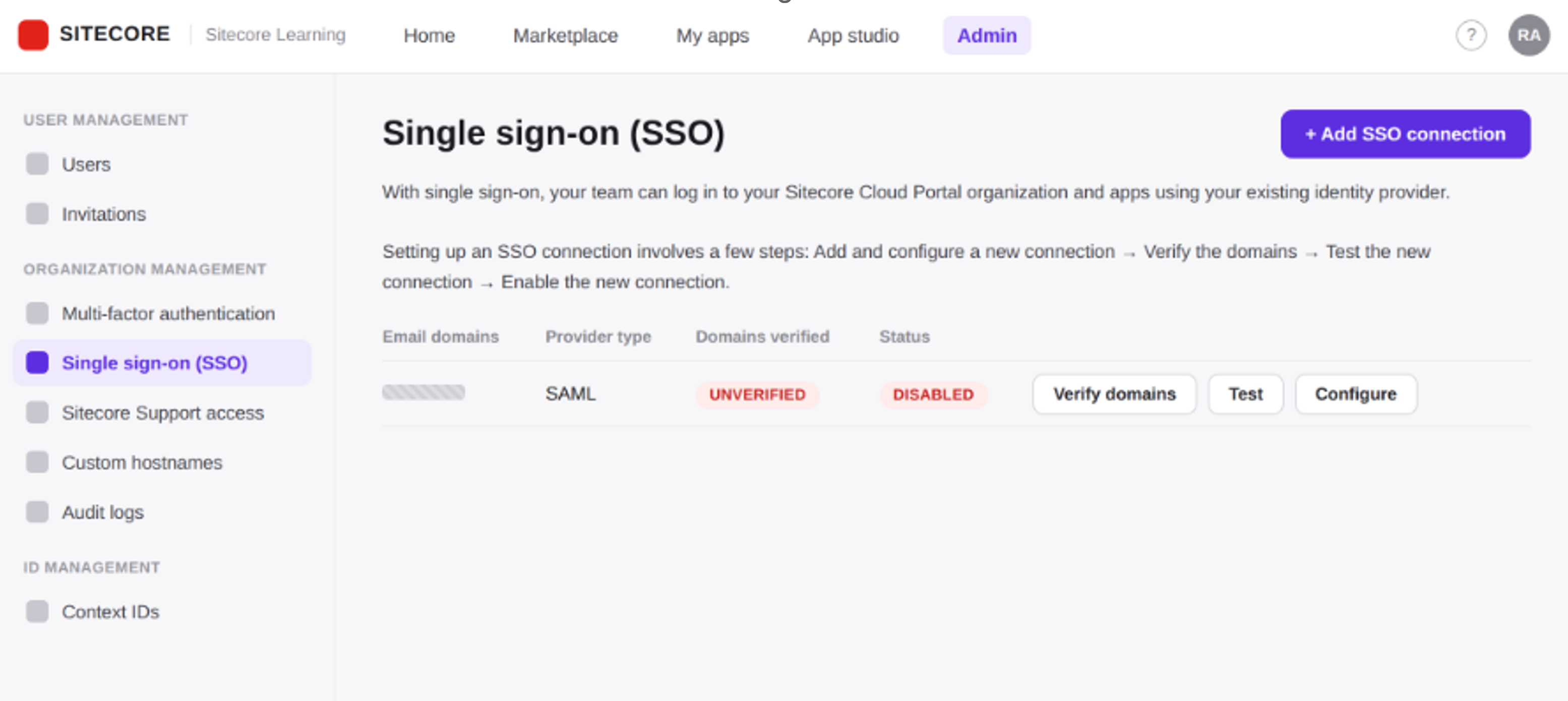
Fig. 3 - Admin → Single sign-on (SSO): a SAML connection exists, but domain verification and status are both incomplete. Domain redacted.
An SSO connection exists here, using SAML, but the domain is unverified and the connection status is disabled. In practice, this means the organization is still relying on individual username-and-password logins even though someone already started the SSO setup. This is a common, and quietly risky, halfway state: the intent to secure access was there, but the configuration was never finished. If you are running a governance review, checking whether SSO is actually enforced not just configured, should be on your checklist every time, because a half-finished SSO setup gives a false sense of security.
The same logic applies to multi-factor authentication and to Sitecore Support access grants. Both are visible in the same Admin area, and both are the kind of setting that gets turned on during an audit and quietly forgotten afterward.
A practical checklist
Use this as a starting point for a quarterly Cloud Portal review, not a one-time cleanup:
- Every environment name follows the -- pattern, with no exceptions for “just a quick test.”
- Every trial and demo environment has an expiry date attached to it, either in the name or in a tracked spreadsheet, and someone owns the decision to renew or delete it.
- Prod environments are confirmed correctly by checking the badge, not assumed by the name.
- Audit logs are reviewed for environments with no recent activity, and those are flagged for decommissioning.
- SSO status is checked and confirmed enabled and verified, not just configured.
- Multi-factor authentication is confirmed active for all organization admins at minimum.
- Sitecore Support access grants are reviewed and revoked if no longer needed.
- Organization user list is reviewed against current team membership, and access for anyone who has left the project is removed.
Closing thought
Cloud Portal gives you the building blocks, projects, environments, badges, an Admin console with real security controls, but it does not give you governance out of the box. That has to be designed and enforced by your team, the same way you would design any other piece of architecture. The organizations that stay in control of their Sitecore footprint are not the ones with fewer environments. They are the ones that treat naming, lifecycle, and access as a policy from day one, instead of a cleanup project they get to eventually.
Screenshot notes: all three images above were reconstructed from a live Sitecore Cloud Portal organization review, with environment names, app names, and the SSO email domain redacted before publishing to protect client confidentiality. Only structural information layout, badges, and configuration status is shown, which is exactly the information a governance review depends on.

Related Blogs

On September 22, 2026, Sitecore deprecated Explorer. Its core jobs, creating content and…
Read More
For years, a big part of Sitecore work happened by clicking. You built templates in the…
Read More
I've spent a good part of this year wiring AI assistants into Sitecore projects. The…
Read MoreArroact is ready to help you grow.
Our Office

Westface, 519/520, Bhagwat Bungalows Rd, Thaltej, Ahmedabad, Gujarat 380059


Pay us a visit for a cup of coffee. We’ll be more than happy to welcome you.