
Building a Custom Index-Based Search in AEM 6.5 Using Oak Lucene and QueryBuilder
Searching is among the most needed functionalities in Adobe Experience Manager (AEM) projects, as it allows users to find all kinds of content, documentation, blogs or product pages. Nevertheless, the issue of slow performance can happen if the content repository is loaded with a lot of content as badly written queries can be used.
The content repository used by Adobe Experience Manager is Apache Jackrabbit Oak.This means that queries are executed by Oak with the help of indexes. In case indexes are not properly set, queries may have to traverse through thousands of nodes before returning the desired results.
This article will demonstrate how to create a custom index-based search with AEM 6.5:
- Custom Oak Lucene Index
- QueryBuilder API
- OSGi Service
- Sling Servlet
- HTL Component
- JavaScript Fetch API
By the end of this implementation, you'll understand how a search request flows from the UI to the repository and how a custom Oak index improves query performance.
Prerequisites
To follow this implementation, you should have:
- Adobe Experience Manager 6.5 Author instance
- Java 8 or Java 11
- Apache Maven
- Basic understanding of HTL and Sling
- CRXDE Lite access
Project Overview
To demonstrate index-based searching, I created a Maven-based AEM project consisting of three modules:
- core – Contains the business logic, OSGi service, and Sling Servlet.
- ui.apps – Contains the HTL search component and Oak index definition.
- ui.content – Provides sample content for testing search functionality.
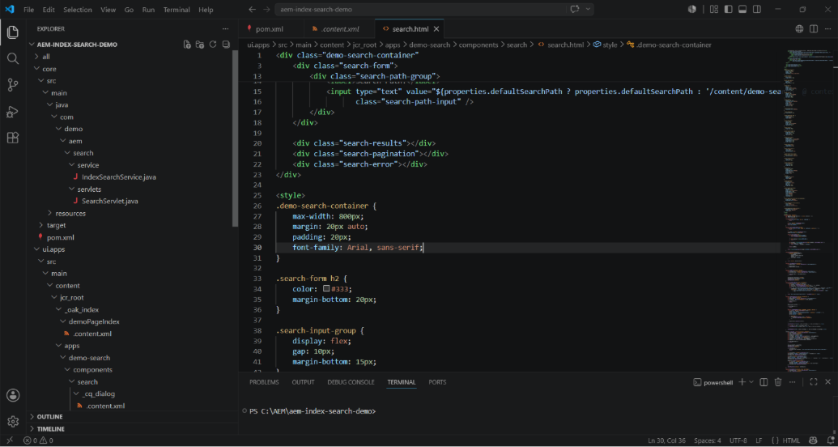
The project includes:
- Custom Lucene Index (demoPageIndex)
- IndexSearchService
- SearchServlet
- Search HTL Component
- Sample Content Pages
- REST Search API
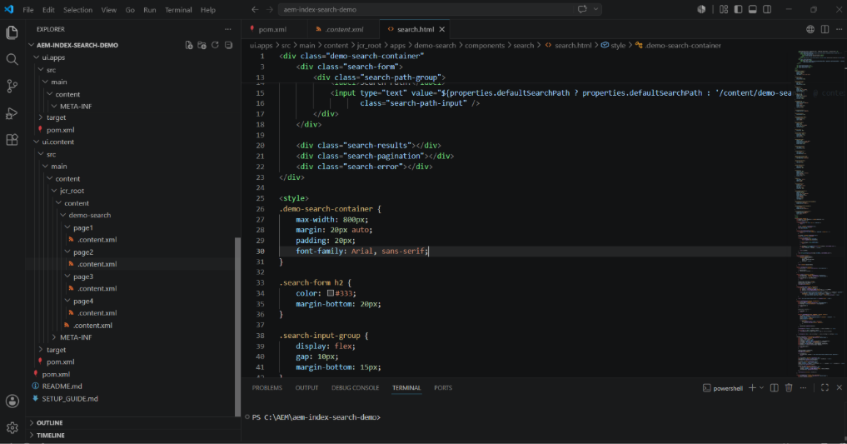
This modular structure follows the standard AEM project architecture, keeping backend logic, UI components, and content packages separated.
Solution Architecture
The complete request flow is straightforward and demonstrates how different AEM layers work together.
User
│
▼
HTL Search Component
│
▼
JavaScript (Fetch API)
│
▼
/bin/searchdemo
│
▼
SearchServlet
│
▼
IndexSearchService
│
▼
QueryBuilder API
│
▼
Oak Lucene Index
│
▼
JCR Repository
Once the user types the keyword and presses Search, the JavaScript code sends an HTTP request to the Sling servlet. The servlet forwards the search request to an OSGi service which prepares QueryBuilder query. Oak evaluates the query using the custom Lucene index and returns matching pages to the UI as JSON.
Creating a Custom Oak Lucene Index
AEM executes queries efficiently only when an appropriate index is available. For this implementation, I created a custom Lucene index named demoPageIndex.
The index configuration includes:
type="lucene"for full-text indexing.includedPaths="/content/demo-search"to restrict indexing to the demo content.queryPaths="/content/demo-search"to ensure only relevant queries use this index.async="[async,nrt]"to support asynchronous and near-real-time indexing.indexRulesforcq:Page.- Aggregation of
jcr:contentso page properties are searchable.
Instead of indexing the entire repository, the index is scoped only to the required content path, reducing indexing overhead and improving query performance.
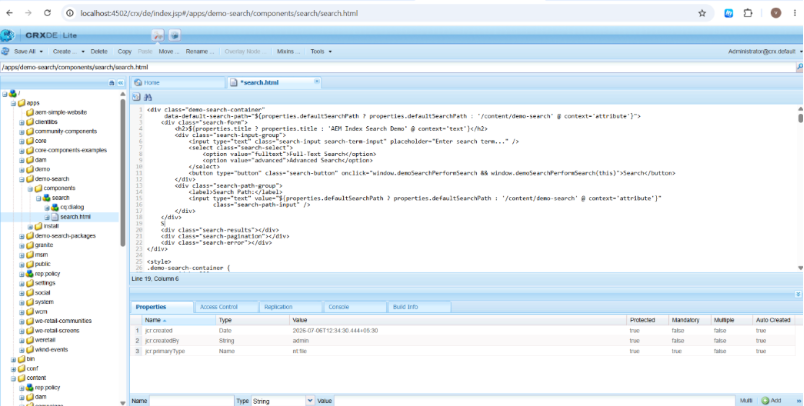
Building the Search Service with QueryBuilder
The core search logic resides inside IndexSearchService.
Instead of manually traversing repository nodes, the service creates a QueryBuilder query using predicates such as:
pathtypefulltextorderbyp.limit
These predicates allow the search to target only cq:Page nodes within a specific content path while leveraging the Lucene index for full-text search.
The service supports two search modes:
Full-Text Search
Searches indexed page titles and descriptions using the provided keyword.
Advanced Search
Supports additional features such as:
- Result limiting
- Sorting by last modified date
- Search scoring
To improve resilience, the implementation also includes a fallback traversal search if QueryBuilder cannot execute the indexed query.
Exposing Search Through a Sling Servlet
To make the search functionality accessible, a Sling Servlet is registered at:
/bin/searchdemo
The servlet accepts parameters including:
| Parameter | Description |
| searchTerm | Keyword entered by the user |
| searchPath | Content path to search |
| searchType | Full-text or advanced search |
| limit | Maximum results |
The servlet calls the search service only after verifying the request, which produces a JSON response that provides the results of the query.
By splitting the servlet from the service, the business logic is kept reusable, and this establishes a neat RESTful API for frontend applications.
Building the Search Component
The frontend is implemented using an HTL component with a lightweight JavaScript layer.
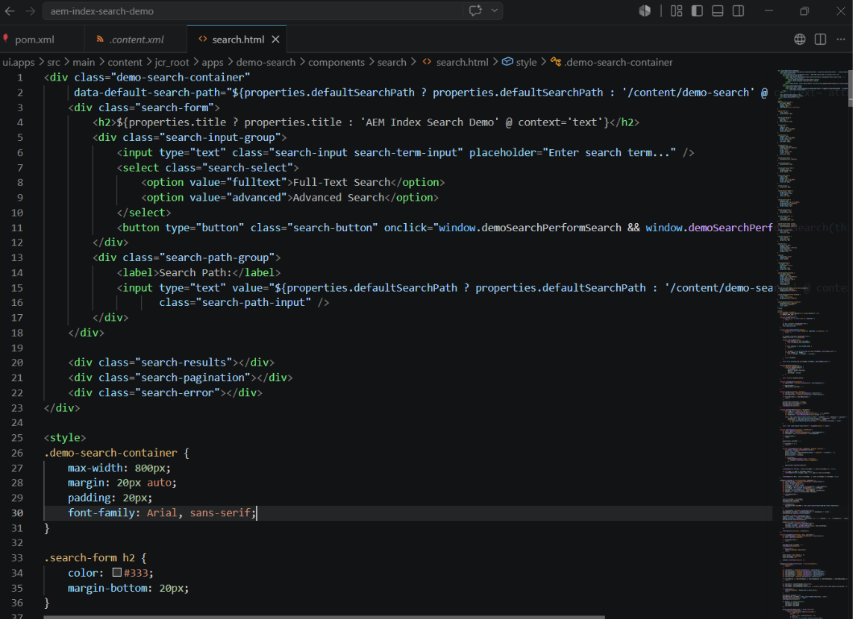
The component includes:
- Search input
- Search type selector
- Configurable search path
- Search button
- Results section
- Pagination controls
When a user makes a request to search, JavaScript calls the servlet asynchronously using the Fetch API.
The returned JSON gets processed and received without refreshing the screen, which ensures better usability.
Additional frontend features include:
- Pagination
- Loading indicator
- Error handling
- Highlighted search terms
- Search score display for advanced search
Testing the Search Component
After deploying the project, the search component can be added to an AEM page and tested using sample content.
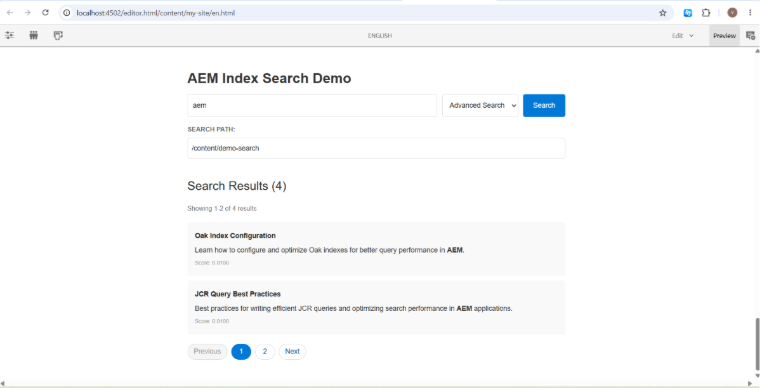
Searching for keywords such as AEM returns matching pages indexed under /content/demo-search.
The implementation displays:
- Total result count
- Highlighted keywords
- Page description
- Search score
- Pagination controls
This demonstrates how the backend search service integrates seamlessly with the frontend component.
Verifying Deployment
Before testing the component, verify that the project bundle is active in the OSGi Console.
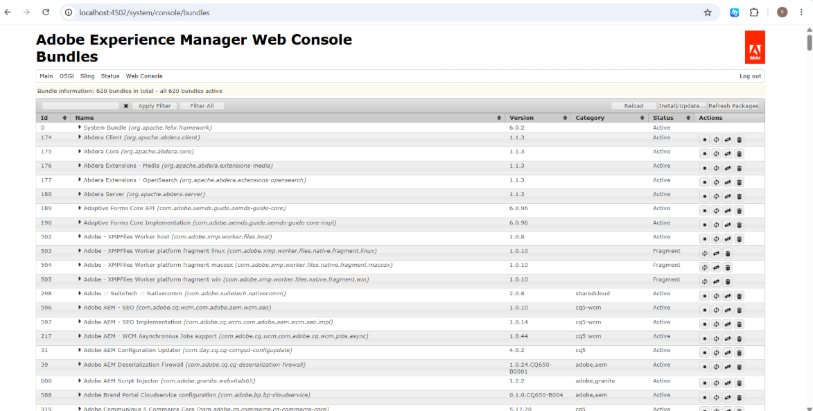
An active bundle confirms that the service and servlet have been successfully deployed and are available for processing search requests.
Key Features of the Implementation
This demo showcases several important AEM concepts:
- Custom Oak Lucene Index
- QueryBuilder-based searching
- OSGi Service architecture
- Sling Servlet REST API
- HTL component development
- AJAX-based search experience
- Search result highlighting
- Pagination support
- Input validation
- HTML sanitization
- Structured JSON responses
- Modular AEM project organization
Best Practices
While implementing search functionality in AEM, consider the following best practices:
- Create custom indexes only for frequently executed queries.
- Restrict indexes using
includedPathsto avoid indexing unnecessary content. - Validate request parameters before executing queries.
- Limit search results to improve response times.
- Implement business rules through OSGi services instead of putting the logic into servlets.
- Clean the content supplied by the end-user.
- Employ the
QueryBuilderDebugger and Explain Query features to ensure that you are using the required index. - Keep an eye on the index size and reindex only when it is necessary.
Conclusion
Efficient search in the context of any content-driven application is very significant and it’s where Adobe Experience Manager excels owing to its strong indexing features which are based on Apache Jackrabbit Oak search capabilities. The solution created using combination of custom Lucene index, QueryBuilder which is an OSGi service, Sling Servlet, and an HTL-based front end provides the complete modular search system.
While serving as a proof of concept in this project, the architecture discussed can be used in any enterprise implementations of AEM as well. Proper indexing, serviceable architecture, and clear separation of concerns will help to achieve better search results in an optimally maintainable and scalable code.
References
- Adobe Experience Manager 6.5 QueryBuilder API Documentation
- Adobe Experience Manager Oak Queries and Indexing Documentation
- Apache Jackrabbit Oak Documentation

Related Blogs

Adobe Experience Manager (AEM) as a Cloud Service provides a local Software Development…
Read More
For years, we built websites for two audiences: people and search engine crawlers. That…
Read More
Migrating a website to a new platform has always meant weeks of manual content mapping,…
Read MoreArroact is ready to help you grow.
Our Office

Westface, 519/520, Bhagwat Bungalows Rd, Thaltej, Ahmedabad, Gujarat 380059


Pay us a visit for a cup of coffee. We’ll be more than happy to welcome you.