Exploring the Snowflake Architecture: What Makes the Cloud Data Warehouse Perform
Many teams choose Snowflake because it "just works smoothly without complication." However, not so many know how. The answer is a simple architectural decision: Snowflake separates storage, computing, and coordination instead of combining all of them in one architecture as conventional data warehouses do.
This split makes it possible for one data team to run a huge amount of operations (up to one petabyte of workload) and for another five-member team to run small queries at the same time without interfering with each other's performance. No need for manual workloads division, no need for workload forecasting half a year in advance, no single point of failure.
In this blog, we will provide you with a description of the Snowflake architecture, explain how queries work in this data warehouse, and suggest some efficient ways of working in Snowflake.
What Is Snowflake?
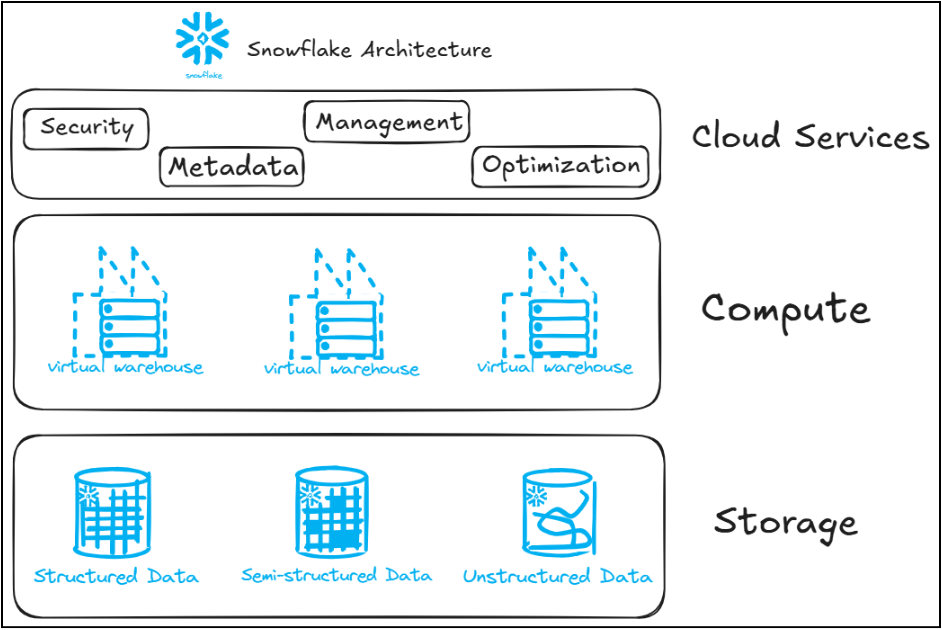
Snowflake is known to be a cloud-based data platform that has been developed for the operations of data warehousing, data lakes, data sharing, data engineering, and a few artificial intelligence and machine learning tasks. The platform is run on AWS, GCP, and Azure. Its main feature is that it is able to separate storage from computing resources such that they can scale independently and stop the need to scale both of them together.
1. Storage Layer: How Snowflake Organizes Your Data
Use case: A retail firm collecting terabytes of transaction information each day has the need for swift requests while bypassing the need for a DBA in charge of partition management.
Overview: Snowflake divides the files into micro-partitions, which are compressed sets of data in the range of 50-500MB. The database collects important information regarding each relevant data partition so it can skip unnecessary files when asked to run an inquiry.
Example: For instance, if a sales database is structured around the date, then the request for "last week's purchases" will be only executed on specific partitions containing that date.
Benefits:
- No manual partitioning or indexing required
- Faster queries through automatic partition pruning
- Lower storage costs from automatic compression
- Historical versions preserved through immutable micro-partitions, enabling Time Travel
2. Compute Layer: Virtual Warehouses Doing the Work
Use case: Imagine a situation where the finance department is busy preparing monthly expense reports at the same time when the product department is running special analytics reports on a query that is not part of any regular reporting process and they couldn’t care less about each other's work.
Overview: The computation runs on separate virtual warehouses which are independent clusters of processing capacity that could manage the workload seamlessly without “interfering” with one another.
Example: the finance department could use a medium warehouse without involving the processing capacity of the product department which could use a small virtual warehouse. Even though they are querying the same data, one department’s query does not cause any delays in the work of the other department.
Benefits:
- Compute scales independently of storage
- Multiple teams can run isolated workloads on separate warehouses
- Query results get cached automatically for repeat queries
- Sizing (Small to Extra Large) adjusts to workload without downtime
3. Auto-Suspend and Auto-Resume: Keeping Compute Costs in Check
Use case: A dev team spins up a large warehouse for ad-hoc data exploration a few times a week, then forgets about it. Without auto-suspend, that warehouse would keep burning credits long after anyone's actually querying it.
Overview: If there is inactivity for some time, Snowflake will automatically put a warehouse to sleep and restart it with a new query.
Example: Say a warehouse is set to auto-suspend after 2 minutes of inactivity. The moment the last query finishes and nobody submits a new one, it goes idle. The next time someone runs a query against it, whether that's ten minutes later or the next morning, it spins back up automatically and picks up right where it left off.
Benefits:
- Compute costs align directly with actual usage
- No manual intervention needed to pause or restart warehouses
- Warehouses resume in seconds when a query comes in
- Reduces waste from idle compute sitting unused
4. Multi-Cluster Warehouses: Handling Concurrency at Scale
Use case: Having multiple dashboard users working at the same time means we need the performance of queries to remain unchanged.
Overview: Whenever queries get very frequent, the Snowflake service takes care of automatically creating more computing clusters based on demand.
Example: If one of the busiest times is Monday mornings, for example, a warehouse can go from using one cluster to four and back once the amount of work gets reduced.
Benefits:
- Handles concurrency spikes automatically
- Reduces query queuing during peak load
- Scales clusters down automatically once demand normalizes
- No architectural redesign needed as user count grows
5. Cloud Services Layer: Security and Coordination
Use case: A healthcare organisation requires rigorous, auditable oversight over who is allowed to access sensitive tables.
Overview: The Cloud Services Layer acts as a management hub for Snowflake. It performs authentication checks, performs query analysis and refinements, and enforces controls through Role-Based Access Control (RBAC) before queries reach a warehouse.
Example: An analyst role can be provided with read-only data access for a sales database, while a separate admin role has full control over the database. When the analyst logs in, this layer checks their permissions before any query is allowed to run.
Benefits:
- Centralized authentication and access control
- Query parsing and optimization happen before execution, saving compute
- Metadata management supports faster, smarter query planning
- Facilitates security by employing role-based permissioning over permissioning by every single user.
How a Query Actually Moves Through Snowflake
Take a simple query for example average salary report of a department. It comes to the Cloud Services Layer first where authentication of user, checking of permissions, and making of execution plan are done. This plan is passed to the Virtual Warehouse in Compute Layer which retrieves the necessary data from the Storage Layer in a compressed columnar form and then processes the aggregation. It is the Cloud Services Layer which does the physical handoff process.
Best Practices for Working with Snowflake Architecture
- Choose the right size for your warehouses. Over-sized ones are a waste of compute resources while the under-sized ones create bottlenecks in the execution of expensive queries.
- Use a separate warehouse for each kind of work. ETL, BI reporting, and data science should have separate warehouses otherwise, it can starve on warehouse functionality.
- Use clustered warehouses token on whenever the number of concurrent users is unpredictable or increasing.
- Have clustering keys for large tables logically so that partitioning pruning is more effective than the standard settings of Snowflake.
- From day one, use and implement RBAC and don’t wait for data sprawl to happen.
- Check the auto-suspend mechanism regularly so dense warehouses would not cause unnecessary waiting times when resuming.
Conclusion
Snowflake's architecture is effective due to its ability to keep storage, computing, and coordination apart from each other. It allows teams to scale only the parts that require scaling and leave out parts that don't to ease the scaling process.
This separation of components also makes Snowflake a useful platform for teams that are just starting out with their data strategy. Organizations do not need to figure out their warehouse sizing or partitioning accurately right off the bat, as Snowflake takes care of a lot of these complexities automatically while allowing you to enhance them whenever you feel comfortable enough to do that.
For companies considering the adoption of a cloud-based platform or seeking to make the most of their current Snowflake setup, it is essential understand the concept of three layers, i.e. what distinguishes the mere use of Snowflake from the actual application of its features.

Related Blogs
In many cases, when a particular person doesn’t want to be exposed to Snowflake SnowSight…
Read MoreArroact is ready to help you grow.
Our Office

Westface, 519/520, Bhagwat Bungalows Rd, Thaltej, Ahmedabad, Gujarat 380059


Pay us a visit for a cup of coffee. We’ll be more than happy to welcome you.