
Next.js 14 to 16: What the 2026 Security Releases Actually Mean
A practical guide to understanding the August 2026 security releases, deciding what needs attention, and planning a controlled migration to a supported Next.js branch.
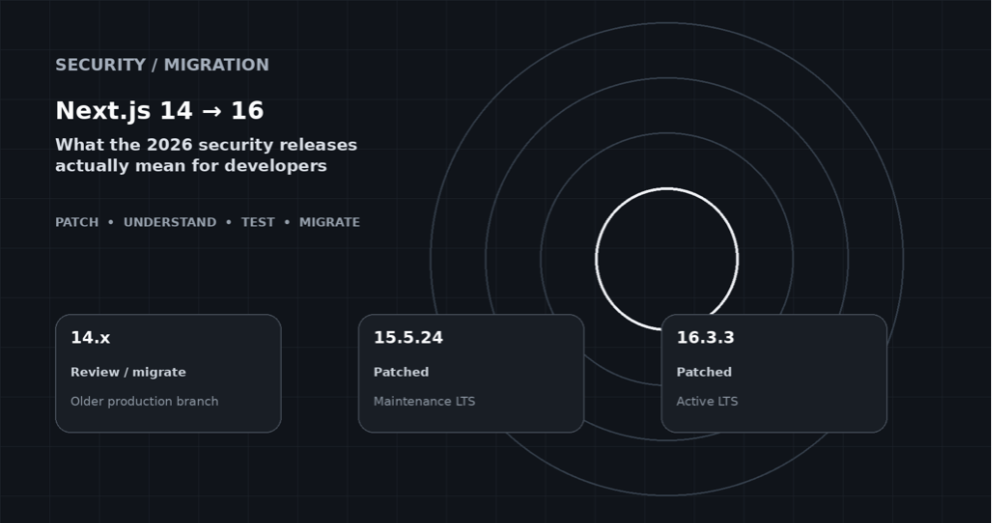
Figure 1 - Next.js release/support picture used as the article’s visual anchor.
| Primary topic | Next.js security, support lifecycle, migration |
| Updated | September 3, 2026 |
| Audience | Frontend engineers, tech leads, security and platform teams |
| Internal reference | Arroact Sitecore technology |
If your production application is still on Next.js 14
These recent security patches certainly justify revisiting the upgrade strategy. Instead, what is actually happening is the fact that Next.js 14 has become officially unsupported, and there are only two currently supported branches of Next.js – 15.x and 16.x.
Specifically, the August 2026 security release included patch versions 15.5.24 and 16.3.3. Thus, for developers who maintain a Next.js 14.x deployment, the patching issue is becoming not just another issue in the patching process but also the chance to rethink their upgrade policy towards the currently supported version.
For those teams which either start a new deployment or just finished the migration process, the best course of action would be to deploy the last patched version from one of the currently supported branches of Next.js and determine its exact version number in the Next.js documentation. In particular, the August 2026 security release included versions 15.5.24 and 16.3.3.
The practical takeaway
First, identify the exact Next.js version and deployment conditions. Patch where appropriate. Then treat the move to Next.js 16 as a controlled migration, not a blind package update.
Why this suddenly feels urgent
Security maintenance is usually invisible when everything is working. A framework upgrade becomes visible when a release contains a critical issue; a supported branch moves forward, or an older application starts accumulating migration work.
That is what happened in August 2026. Next.js moved its planned security release forward to August 25 after identifying an additional critical issue. The final release addressed two critical vulnerabilities and provided patched releases for Next.js 15.5 and 16.3.
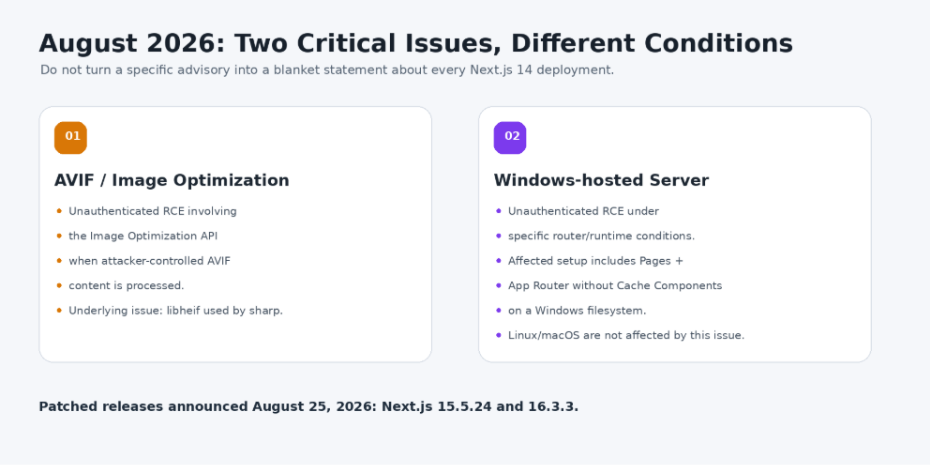
Figure 2 - The two critical advisories have different prerequisites; evaluate the exact deployment rather than the headline.
So, is Next.js 14 itself “the vulnerability”?
No. That wording is too broad. Security advisories have affected-version ranges and, sometimes, conditions involving the router, operating system, image format, or enabled features.
Critical issue #1: AVIF image optimization
Next.js reported an unauthenticated remote-code-execution issue involving the Image Optimization API when an attacker-controlled AVIF image is processed. The underlying issue is in libheif, used by sharp. The patched releases disable AVIF optimization until the upstream fix is propagated.
Critical issue #2: Windows-hosted servers
The second critical issue is narrower. Next.js says it affects applications using both the Pages Router and App Router without Cache Components when the server uses a Windows filesystem. Linux and macOS are not affected by this particular issue.
Why this distinction matters
A useful security article tells readers what is affected and what is not. “Next.js 14 is critically vulnerable” is not an accurate description of these advisories.
Where Next.js 14 fits into the bigger picture
The most critical question regarding Next.js 14 application is not about its functionality. It is possible to build and serve pages using the old version and have no issues.
However, the more crucial question is whether the version of the framework still corresponds to the project’s security, support, and maintenance needs.
As of September 3, 2026, the following versions of Next.js remain supported: 16.x (Active LTS) and 15.x (Maintenance LTS). Next.js 14.x falls under the category of unsupported Next.js versions according to the Next.js support policy.
That changes the upgrade of conversation. A team running 14.x does not necessarily need to panic and immediately jump to the latest major version. But it should have a clear answer to three questions:
- Why are we still on 14.x?
- What is our target supported version?
- When will the migration be completed and reviewed?
For some applications, moving through a staged migration may make sense. For others, the team may be able to move more directly after reviewing the relevant upgrade guidance and testing the application properly. The important part is to make the decision deliberately rather than allowing an unsupported framework version to remain in production simply because the application still works.
Why I would not recommend a blind 14 → 16 upgrade
The security reason to move forward is real, but upgrading a production application from Next.js 14 to 16 is not the same as changing a single dependency version.
Next.js 16 introduces breaking changes that can affect request APIs, build tooling, middleware, configuration and the runtime environment. That means the safest approach is to treat the security work and the framework of migration as related but separate pieces of engineering work.
A safer sequence
Patch the immediate security exposure first where appropriate. Then work through the compatibility changes required for the larger migration.
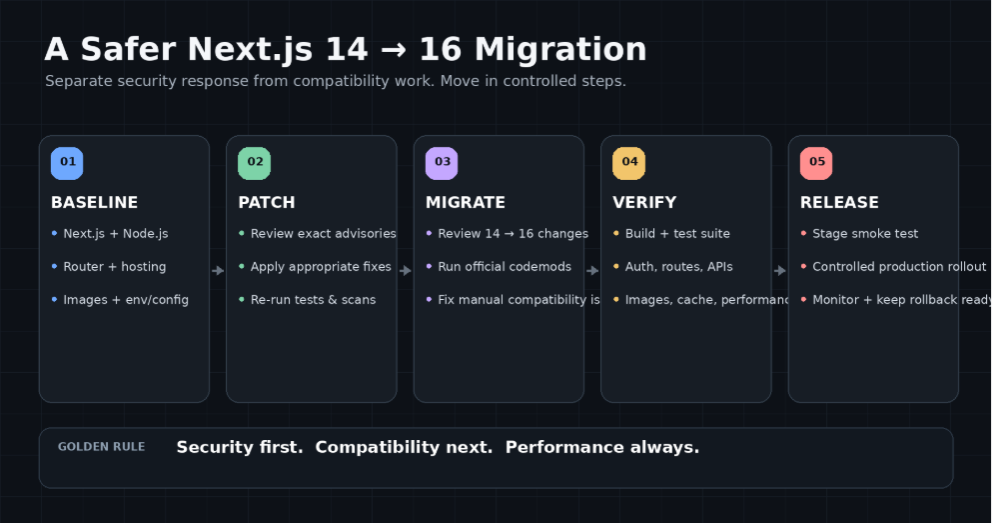
Figure 3 - A practical 14 → 16 migration sequence. The 15.x line can be used as a staged path when it reduces risk; it is not a mandatory stepping stone for every application.
Next.js 16 requires Node.js 20.9+, makes Turbopack the default for next dev and next build, and removes synchronous access to request-time APIs.
What actually changes in Next.js 16?
- Node.js 20.9+ is required; Node.js 18 is no longer supported.
- Turbopack is stable and used by default with next dev and next build.
- Synchronous access to params, searchParams, cookies(), headers(), and draftMode() is removed.
- The official upgrade codemod can handle several mechanical changes, including Turbopack configuration, next lint, middleware → proxy, and stabilized APIs.
- AMP support and the next lint command are removed.
- serverRuntimeConfig and publicRuntimeConfig are removed in favor of environment variables.
A migration plan that works in real projects
1. Baseline the current application
Record next, react, react-dom, Node.js, package manager, deployment platform, router type, image configuration, middleware/proxy usage, Server Actions and Cache Components.
2. Identify security exposure
Compare the exact Next.js version and deployment conditions with current advisories. Do not assume the headline alone tells you whether the app is affected.
3. Patch before the larger migration
Where a current supported patch release is available and compatible with the application, patch first. This separates urgent security work from compatibility work.
4. Use the official migration tooling
Follow the Next.js 16 upgrade guide and use the available codemods to handle mechanical changes. If synchronous request APIs remain, address them as part of the migration.
5. Test the paths users actually touch
Test authentication, forms, Server Actions, API routes, redirects, images, caching, metadata, errors and third-party integrations.
6. Stage the release
Use a production-like staging environment and test the real build/startup path.
7. Release with rollback ready
Monitor logs and user behavior. Keep the previous known-good release available until the new version proves stable.
Codebase checklist
| Area | Look for | Why it matters |
| Request APIs | params, searchParams, cookies(), headers(), draftMode() | Next.js 16 requires async access. |
| Routing | Pages Router + App Router | Relevant to migration and some security conditions. |
| Images | next/image, AVIF, sharp | Image optimization is part of the August 2026 advisory. |
| Build | Webpack/Turbopack config | Turbopack becomes the default in 16. |
| Lint | next lint, ESLint config | next lint is removed in 16. |
| Runtime | serverRuntimeConfig / publicRuntimeConfig | These are removed; environment variables are the replacement. |
| Hosting | Windows / Linux / macOS | The Windows RCE condition is platform-specific. |
Commands I would run before touching production
npm ls next react react-dom
node -v
npm run build
Then inspect the diff. If the migration changes hundreds of unrelated files, stop and split the work. A smaller, reviewable migration is easier to trust.
When should a team stay on 14 temporarily?
Sometimes staying 14.x temporarily is reasonable, but it should be treated as an exception with a documented migration plan not as the normal long-term state of the application.
A large application may have vendor dependencies, a constrained release window, or a test suite that needs additional time before a major framework of migration.
In that situation, record the current security status, the target supported version, the migration owner, and the next review date. The important thing is that the application has a defined path out of 14.x.
A useful rule
If nobody can explain why the app is still on 14.x, who owns the upgrade, and when it will be reviewed, the version is probably being kept by inertia rather than by design.
What not to write in a security ticket
Avoid statements such as:
- “Next.js 14 is critically vulnerable.”
- “Every application running Next.js 14 is remotely exploitable.”
- “Just upgrade to 16 and everything is fixed.”
- “npm install passed, so the migration is complete.”
Instead, document the exact Next.js version, advisory, affected conditions, deployment environment, mitigation, target version, test plan, and release owner.
Final thoughts
The recent Next.js security releases are a useful reminder that framework maintenance is part of application security. The message is that older versions will make maintaining security a migration issue at some point in time.
For any developer or team who’s still using Next.js 14, then there’s really only one course of action, and it starts with identifying the exposure, applying the patch when needed, learning about the breaking changes from version 16 of Next.js, and doing the migration carefully, step by step.
It won’t be as exciting as an upgrade, but it will certainly yield a secure application.
Official references
- Next.js August 2026 Security Release: https://nextjs.org/blog/august-2026-security-release
- Next.js Support Policy: https://nextjs.org/support-policy
- Next.js 16 Upgrade Guide: https://nextjs.org/docs/app/guides/upgrading/version-16
- Next.js 14 → 15 Upgrade Guide: https://nextjs.org/docs/app/guides/upgrading/version-15
- Next.js Codemods: https://nextjs.org/docs/app/guides/upgrading/codemods
- Arroact — Sitecore Technology: https://www.arroact.com/sitecore-technology/

Related Blogs

Every content team hits the same wall eventually: one campaign idea needs to become a…
Read More
If you have worked with Sitecore for a while you may remember when Sitecore marketing…
Read More
On September 22, 2026, Sitecore deprecated Explorer. Its core jobs, creating content and…
Read MoreArroact is ready to help you grow.
Our Office

Westface, 519/520, Bhagwat Bungalows Rd, Thaltej, Ahmedabad, Gujarat 380059


Pay us a visit for a cup of coffee. We’ll be more than happy to welcome you.