Personalization in Sitecore: Step by Step Implementation Guide
In the current dynamic state of the Internet, standard content fails to meet users’ demands adequately. What users require is tailor-made content, regardless of whether it is according to their geographical positioning or their browsing behaviour or even prior experiences with your site. This is why you must utilize personalization tools offered by Sitecore.
As you might be aware, personalization of your site’s content using Sitecore can prove difficult because although many organizations realize the benefits associated with dynamic content, most of them do not know how to implement personalization in Sitecore.
Understanding What You're Building
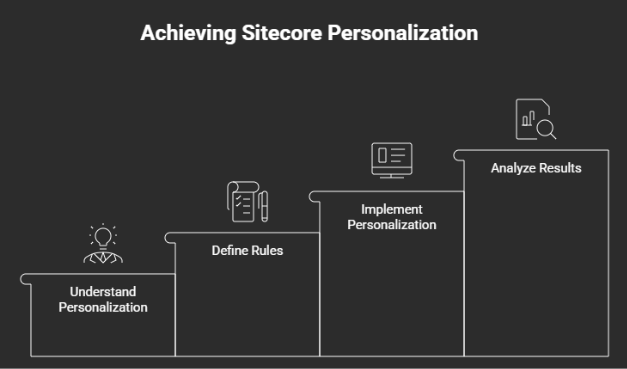
Before getting to the actual implementation, it is necessary to understand what the term personalization refers to when talking about Sitecore. Personalization allows for displaying content, components, or experiences in a completely different way depending on certain rules that you can establish yourself. They may be related to the user's behaviour, their device, the current page, or even some external systems.
Imagine the case of a shopkeeper who greets people by showing them products that they have already bought before. If another visitor is shopping for office supplies, you highlight your business packages. That's personalization in action.
Step 1: Plan Your Personalization Strategy
The greatest successes are achieved through having a solid strategy first, not the technology setup itself. Ask yourself the following:
- Which segments of your audience matter the most?
- What content modifications would add value to each individual segment?
- Do you have enough information on hand to identify segments?
- How can you track improvements from personalization?
Don't think you should personalize everything instantly. Begin with the pages that get a lot of traffic and would see value from personalization. Changing a homepage for five segments is much better than personalizing fifty low-traffic pages.
Step 2: Set Up Your Visitor Profiles and Segments
Sitecore has the idea of profiles and profile cards for visitor tracking purposes. Profiles can track a visitor's interest in some subject such as "sports" or "technology" depending on their interactions with your content.
To achieve this:
You have to know first what type of profile you have to create depending on the type of goals of your business. If you are into software for companies, you can do something like "Decision Maker Profile" or "Technical Evaluators". If you have a commercial site, you can make "Budget Buyers" or "VIP Clints".
Profile cards keep points based on interactions with content associated with a particular profile. By reading three articles on enterprise solutions on your website, you can gain points and be identified as an enterprise-oriented visitor by Sitecore.
Step 3: Define Your Rules and Conditions
That’s where the personalization criteria come in. You're basically saying, “If someone meets criteria X, then we'll show them criteria Y.”
Criteria can take many forms including:
Behavioural: “Visited our pricing page in the past 30 days”
Profile: “Has a high profile score for ‘Enterprise”
Device: “Using a mobile device to access our website”
Geography: “Located within North America”
Source: “Accessed from marketing campaign Z”
Begin with something straightforward, such as, “If someone is using a mobile device, then show them the mobile-specific variant of this component.” From there, you can build out much more complex criteria.
Step 4: Create Your Personalized Content Variants
And now for the fun stuff.
Make variants of content in accordance with all the rules you identified previously. There is no need for your variations to be entirely different; oftentimes, it's all in the minor details that can make the whole difference.
Maybe you change your headline format, add different visuals, utilize different calls to action or highlight specific product features. Experiment whenever you have an opportunity but remember one thing personalized content isn't supposed to win you anything. It should rather be relevant to the reader.
While developing various versions of your content, consider all the aspects related to your brand strategy. Personalization is not about stalking, but rather about relevancy.
Step 5: Test, Measure, and Refine
Start off by setting up the framework for measurement before initiating your personalization campaign. Are there any changes in the conversion rate? How much time do they spend on the website? What about their click-through rate?
Let everything settle down for two to four weeks before moving forward. There might be unexpected behaviour among your visitors. It’s important information for your next try.
Here’s what Sitecore analytics will tell you:
- How many users qualify against each rule?
- Do some variants perform better than others?
- Are there any surprising insights in the data?
Common Mistakes to Avoid
Do not try to make too much of the first segments that you create. Create a couple of significant ones, not twenty segments for which no one ever fires off.
Personalization does require data. If you're personalizing using some rules that do not apply to most visitors, then you're increasing complexity without getting any benefit.
Just keep in mind that not all components need to be personalized.
Moving Forward
Sitecore Personalization is a Process, not a Project
Your first attempt at personalization may not be overly complicated, but the skills that you build in the process can prove to be helpful in future, more advanced attempts. more advanced attempts with Arroact’s Sitecore development services.
Those who are exposed to personalized content engage with the website in a deeper manner; they are eager to explore what the site has to offer and to act.

Related Blogs

Every content team hits the same wall eventually: one campaign idea needs to become a…
Read More
If you have worked with Sitecore for a while you may remember when Sitecore marketing…
Read More
On September 22, 2026, Sitecore deprecated Explorer. Its core jobs, creating content and…
Read MoreArroact is ready to help you grow.
Our Office

Westface, 519/520, Bhagwat Bungalows Rd, Thaltej, Ahmedabad, Gujarat 380059


Pay us a visit for a cup of coffee. We’ll be more than happy to welcome you.